
@gtkx/react / GtkPrintUnixDialog
Variable: GtkPrintUnixDialog
constGtkPrintUnixDialog:"GtkPrintUnixDialog"
Defined in: packages/react/src/generated/jsx.ts:14493
A print dialog for platforms which don’t provide a native print dialog, like Unix.
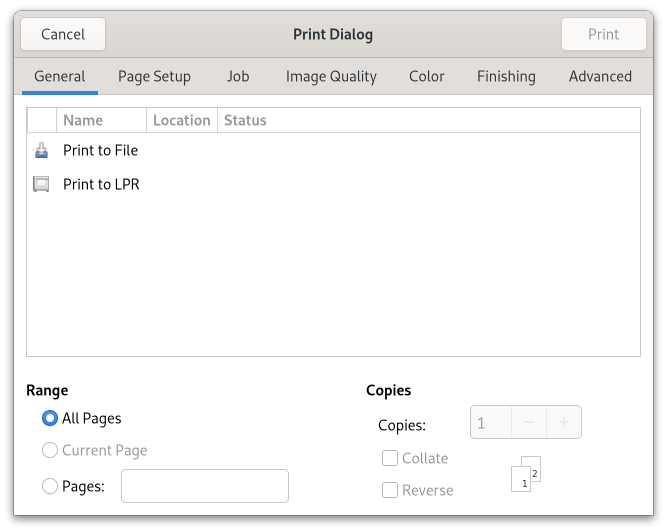
It can be used very much like any other GTK dialog, at the cost of the portability offered by the high-level printing API with Gtk.PrintOperation.
In order to print something with GtkPrintUnixDialog, you need to use Gtk.PrintUnixDialog.get_selected_printer to obtain a Gtk.Printer object and use it to construct a Gtk.PrintJob using Gtk.PrintJob.new.
GtkPrintUnixDialog uses the following response values:
- %GTK_RESPONSE_OK: for the “Print” button
- %GTK_RESPONSE_APPLY: for the “Preview” button
- %GTK_RESPONSE_CANCEL: for the “Cancel” button
GtkPrintUnixDialog as GtkBuildable
The GtkPrintUnixDialog implementation of the GtkBuildable interface exposes its notebook internal children with the name “notebook”.
An example of a GtkPrintUnixDialog UI definition fragment:
<object class="GtkPrintUnixDialog" id="dialog1">
  <child internal-child="notebook">
    <object class="GtkNotebook" id="notebook">
      <child>
        <object type="GtkNotebookPage">
          <property name="tab_expand">False</property>
          <property name="tab_fill">False</property>
          <property name="tab">
            <object class="GtkLabel" id="tablabel">
              <property name="label">Tab label</property>
            </object>
          </property>
          <property name="child">
            <object class="GtkLabel" id="tabcontent">
              <property name="label">Content on notebook tab</property>
            </object>
          </property>
        </object>
      </child>
    </object>
  </child>
</object>
CSS nodes
GtkPrintUnixDialog has a single CSS node with name window. The style classes dialog and print are added.