

Actions and Shortcuts
A command that a menu item, a button and a keyboard shortcut all run is a GTK action: a named Gio.Action that each of them activates by its prefixed name, such as win.new. This page declares actions in JSX and connects menus, buttons, accelerators and the shortcuts dialog to them.
Declaring actions
Pass GSimpleAction elements to the actions prop of the application element or a window. Actions on the application are named app.<name>, and those on an AdwApplicationWindow or GtkApplicationWindow are named win.<name>:
import { AdwApplicationWindow } from "@gtkx/jsx/adw";
import { GSimpleAction } from "@gtkx/jsx/gio";
import { GtkLabel } from "@gtkx/jsx/gtk";
import { quit } from "@gtkx/react";
import { useState } from "react";

export const Window = () => {
    const [count, setCount] = useState(0);

    return (
        <AdwApplicationWindow
            title="Notes"
            onCloseRequest={quit}
            actions={
                <>
                    <GSimpleAction
                        name="new"
                        onActivate={() => setCount(count + 1)}
                    />
                    <GSimpleAction
                        name="clear"
                        enabled={count > 0}
                        onActivate={() => setCount(0)}
                    />
                </>
            }
        >
            <GtkLabel label={`${count} notes`} />
        </AdwApplicationWindow>
    );
};
The actions prop belongs to every element whose class implements Gio.ActionMap. An action is added when its element mounts and removed when it unmounts. enabled={false} greys out every menu item and button that points at the action and stops its accelerators.
Parameters and state
An action with a parameterType receives a GLib.Variant when activated. Menu items and buttons pass it as their target:
import * as GLib from "@gtkx/gi/glib";
import { GSimpleAction } from "@gtkx/jsx/gio";

export const OpenAction = ({ onOpen }: { onOpen: (name: string) => void }) => (
    <GSimpleAction
        name="open"
        parameterType={GLib.VariantType.new("s")}
        onActivate={(parameter) => {
            if (parameter !== null) onOpen(parameter.getString()[0]);
        }}
    />
);
An action with a state is a toggle or a choice. Render the state from React and update it in onChangeState, which receives the requested value. A menu item shows a boolean state as a check box:
import * as GLib from "@gtkx/gi/glib";
import { GSimpleAction } from "@gtkx/jsx/gio";

export const PreviewAction = ({
    preview,
    onPreviewChange,
}: {
    preview: boolean;
    onPreviewChange: (preview: boolean) => void;
}) => (
    <GSimpleAction
        name="preview"
        state={GLib.Variant.newBoolean(preview)}
        onChangeState={(value) => {
            if (value !== null) onPreviewChange(value.getBoolean());
        }}
    />
);
Activating a boolean action without a parameter requests the opposite state, so the menu item toggles it without an onActivate handler. See Gio.SimpleAction for the native rules.
Actions for one widget
Actions that belong to part of the window, such as a tab's context menu, go in a GSimpleActionGroup in that widget's actionGroups prop. Its prefix names them, and they reach the widget and its descendants:
import { GSimpleAction, GSimpleActionGroup } from "@gtkx/jsx/gio";
import { GtkBox } from "@gtkx/jsx/gtk";

export const NoteTab = ({
    onPin,
    onClose,
}: {
    onPin: () => void;
    onClose: () => void;
}) => (
    <GtkBox
        actionGroups={
            <GSimpleActionGroup
                prefix="note"
                actions={
                    <>
                        <GSimpleAction name="pin" onActivate={onPin} />
                        <GSimpleAction name="close" onActivate={onClose} />
                    </>
                }
            />
        }
    />
);
Menus
GMenu describes a menu as data. Pass it as the menuModel of a GtkMenuButton, or of a GtkPopoverMenu for a context menu, and point each item at an action:
import { GMenu } from "@gtkx/jsx/gio";
import { GtkMenuButton } from "@gtkx/jsx/gtk";

export const MainMenu = () => (
    <GtkMenuButton
        primary
        iconName="open-menu-symbolic"
        tooltipText="Main Menu"
        menuModel={
            <GMenu
                items={[
                    {
                        section: [
                            { label: "New Note", action: "win.new" },
                            { label: "Show Preview", action: "win.preview" },
                        ],
                    },
                    {
                        section: [
                            {
                                label: "Keyboard Shortcuts",
                                action: "win.shortcuts",
                            },
                            { label: "About Notes", action: "win.about" },
                        ],
                    },
                ]}
            />
        }
    />
);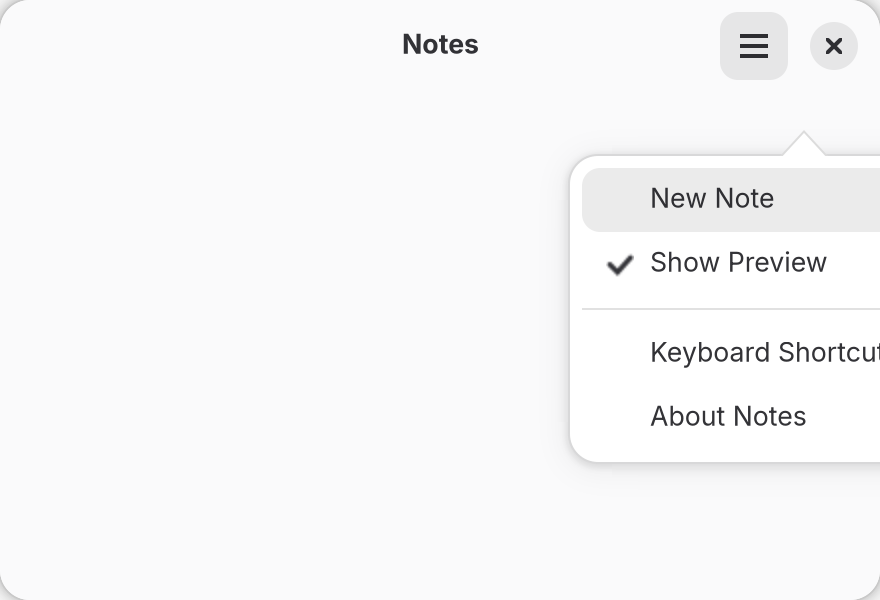
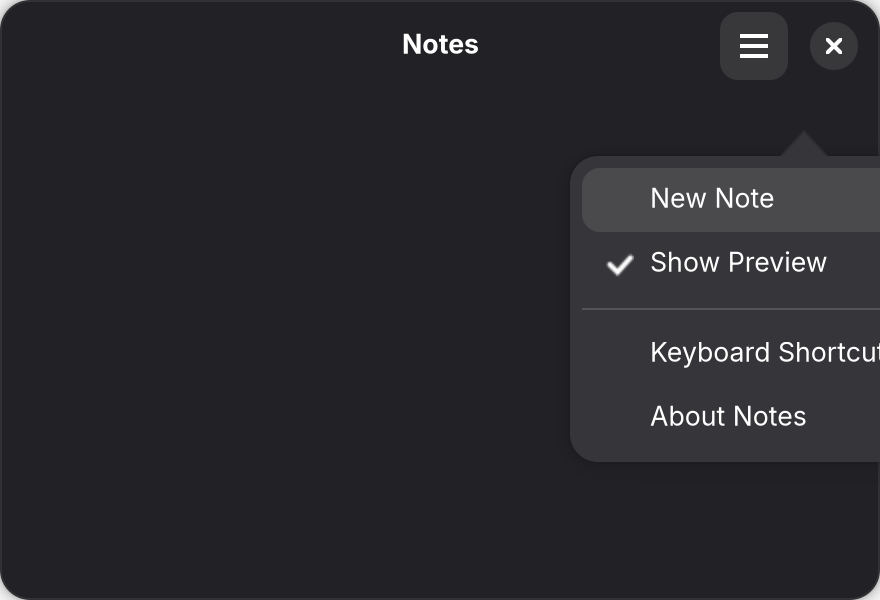
win.preview.section groups items between separators, and submenu opens a nested menu. An item for an action with a parameter names its target in the action string, as in win.open('todo.md'). The menu rebuilds when items changes. Items also take GTK's other menu attributes in camelCase, such as icon, and Widgets in menus puts a widget in place of an item.
An item whose action is disabled is greyed out; hiddenWhen: "action-disabled" hides it instead. primary makes F10 open the main menu, as the GNOME HIG expects.
Buttons
Any widget that implements Gtk.Actionable, such as GtkButton, GtkToggleButton or GtkCheckButton, runs an action through its actionName, and passes actionTarget as the parameter:
import * as GLib from "@gtkx/gi/glib";
import { GtkButton } from "@gtkx/jsx/gtk";

export const Toolbar = () => (
    <>
        <GtkButton
            iconName="list-add-symbolic"
            tooltipText="New Note (Ctrl+N)"
            actionName="win.new"
        />
        <GtkButton
            label="Open To-do"
            actionName="win.open"
            actionTarget={GLib.Variant.newString("todo.md")}
        />
    </>
);
The button follows the action's enabled state. A toggle button for a stateful action shows the action's state.
Keyboard accelerators
Bind keys to actions with the application element's actionAccels prop. Each entry takes the detailed action name and one or more accelerators in GTK's accelerator syntax:
import { AdwApplication } from "@gtkx/jsx/adw";
import { GSimpleAction } from "@gtkx/jsx/gio";
import { quit } from "@gtkx/react";
import { Window } from "./components/window.js";

export const App = () => (
    <AdwApplication
        actionAccels={[
            { detailedActionName: "win.new", accels: ["<Control>n"] },
            {
                detailedActionName: "win.shortcuts",
                accels: ["<Control>question"],
            },
            { detailedActionName: "app.quit", accels: ["<Control>q"] },
        ]}
        actions={<GSimpleAction name="quit" onActivate={() => quit()} />}
    >
        <Window />
    </AdwApplication>
);
The keys work in every window that has the action, and menus show them beside the item. Removing an entry clears its accelerators. Keyboard in the GNOME HIG lists the standard keys.
Shortcuts without an action
A key that runs code without an action, or that only applies in part of the window, uses a GtkShortcutController in a widget's controllers prop:
import * as Gtk from "@gtkx/gi/gtk";
import {
    GtkCallbackAction,
    GtkShortcut,
    GtkShortcutController,
    GtkShortcutTrigger,
} from "@gtkx/jsx/gtk";

export const SearchShortcut = ({
    onToggleSearch,
}: {
    onToggleSearch: () => void;
}) => (
    <GtkShortcutController
        scope={Gtk.ShortcutScope.GLOBAL}
        shortcuts={
            <GtkShortcut
                trigger={<GtkShortcutTrigger accelerator="<Control>f" />}
                action={
                    <GtkCallbackAction
                        callback={() => {
                            onToggleSearch();
                            return true;
                        }}
                    />
                }
            />
        }
    />
);
Add it as controllers={<SearchShortcut onToggleSearch={toggleSearch} />} on the window. GLOBAL scope handles the key anywhere in the window. A callback that returns false leaves the key unhandled, so other handlers still receive it. See Gtk.ShortcutController for the other scopes.
The shortcuts dialog
AdwShortcutsDialog lists the app's shortcuts. Give an item the actionName of an action with an accelerator, and it shows the keys from actionAccels; give it an accelerator for keys that no action owns:
import {
    AdwShortcutsDialog,
    AdwShortcutsItem,
    AdwShortcutsSection,
} from "@gtkx/jsx/adw";

export const Shortcuts = ({ onClose }: { onClose: () => void }) => (
    <AdwShortcutsDialog onClosed={onClose}>
        <AdwShortcutsSection title="General">
            <AdwShortcutsItem title="New note" actionName="win.new" />
            <AdwShortcutsItem title="Search notes" accelerator="<Control>f" />
            <AdwShortcutsItem
                title="Keyboard shortcuts"
                actionName="win.shortcuts"
            />
            <AdwShortcutsItem title="Quit" actionName="app.quit" />
        </AdwShortcutsSection>
    </AdwShortcutsDialog>
);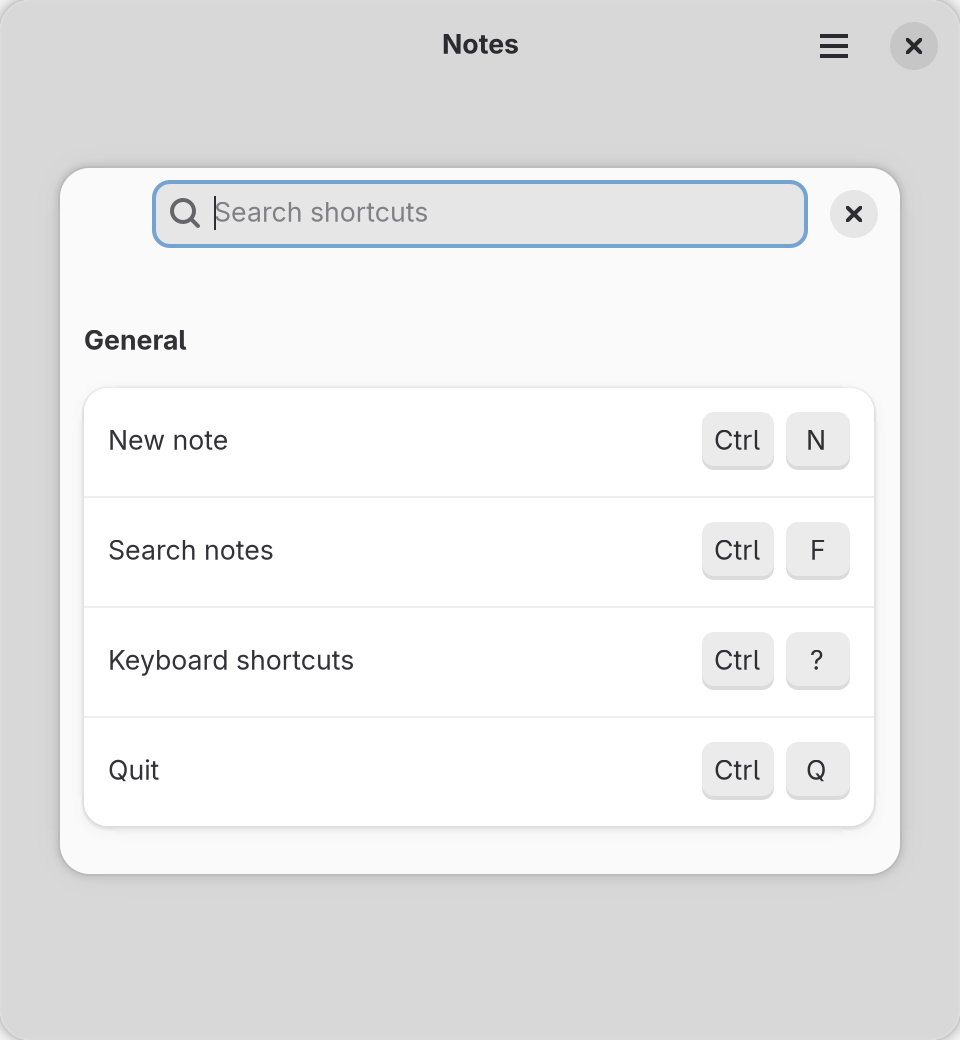
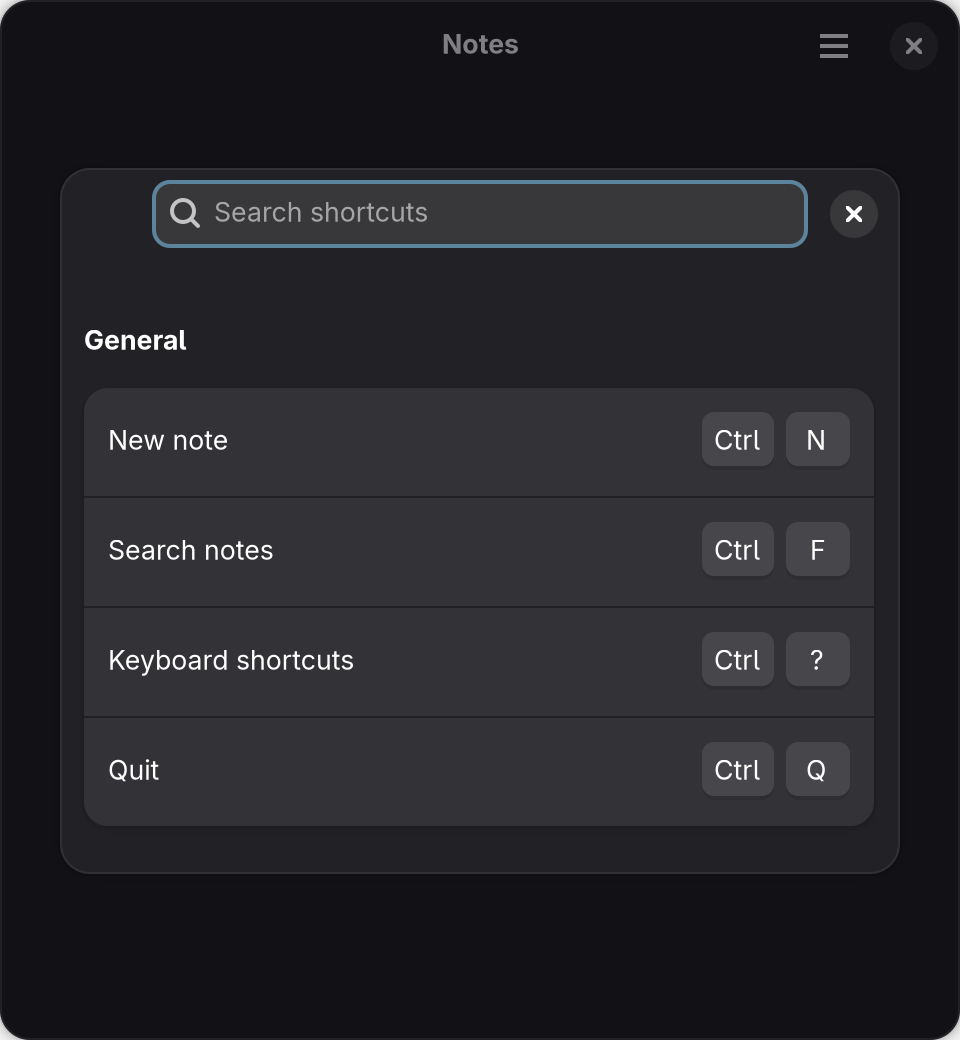
The items describe shortcuts; they do not register them. Render the dialog from state that a win.shortcuts action sets, and clear that state in onClosed, as Dialogs shows.
Actions in a registered class
A registered class that builds its own action group, such as a widget with a context menu, adds a table of actions with addActionEntries, GJS's add_action_entries and C's g_action_map_add_action_entries. Every Gio.ActionMap has it, including Gio.SimpleActionGroup, Gtk.Application, Adw.Application, Gtk.ApplicationWindow and the classes registered from them:
import * as Gio from "@gtkx/gi/gio";
import * as Gtk from "@gtkx/gi/gtk";
import { registerClass } from "@gtkx/runtime";

class ChartBase extends Gtk.Widget {
    declare private chartActions: Gio.SimpleActionGroup;
    declare depth: number;

    override vfuncConstructed(): void {
        super.vfuncConstructed();
        this.depth = 5;
        this.chartActions = new Gio.SimpleActionGroup();
        this.chartActions.addActionEntries([
            { name: "zoom-in", activate: () => this.setDepth(this.depth - 1) },
            { name: "zoom-out", activate: () => this.setDepth(this.depth + 1) },
            {
                name: "set-depth",
                parameterType: "i",
                activate: (_action, depth) =>
                    this.setDepth(depth?.getInt32() ?? 5),
            },
            {
                name: "show-hidden",
                state: "false",
                changeState: (action, value) => {
                    if (value !== null) action.setState(value);
                    this.queueDraw();
                },
            },
        ]);
        this.insertActionGroup("chart", this.chartActions);
    }

    setDepth(depth: number): void {
        this.depth = Math.max(1, depth);
        this.queueDraw();
    }
}

export const Chart = registerClass(ChartBase, { typeName: "ExampleChart" });
A menu item with the action chart.zoom-in then activates the first entry. Each entry, typed as Gio.ActionEntryObj, takes GJS's fields in camelCase:
name, the action's name.activate(action, parameter), connected to the action'sactivatesignal.parameterType, a GVariant type string such as"s"or aGLib.VariantType. Without it, the action takes no parameter.state, the initial state in GVariant text such as"'large'"or"true", a boolean or aGLib.Variant. Without it, the action is stateless.changeState(action, value), connected tochange-state. Without it, a change request sets the state directly.
As in GJS and C, both callbacks receive the action first and run with this set to it; a handler passed to connect receives only the signal's arguments. An entry without a string name, an invalid parameterType or a state that does not parse throws, and the entries before it stay added. removeActionEntries takes the same entries and removes the actions they name.