
2. Styling with CSS-in-JS
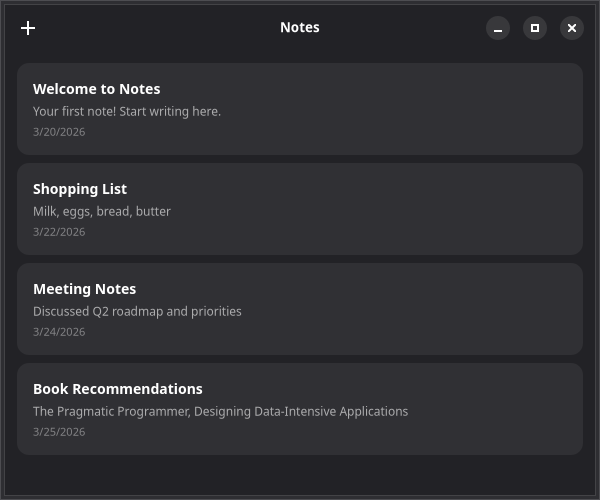
Now that you have a window with a header bar, let's add some notes and style them using @gtkx/css.
Adding Note State
First, add state management for notes:
tsx
import { useState } from "react";

interface Note {
    id: string;
    title: string;
    body: string;
    createdAt: Date;
}

export default function App() {
    const [notes, setNotes] = useState<Note[]>([
        { id: "1", title: "Welcome", body: "Your first note!", createdAt: new Date() },
        { id: "2", title: "Shopping List", body: "Milk, eggs, bread", createdAt: new Date() },
        { id: "3", title: "Meeting Notes", body: "Discuss project timeline and deliverables", createdAt: new Date() },
    ]);

    const addNote = () => {
        const note: Note = {
            id: crypto.randomUUID(),
            title: "Untitled",
            body: "",
            createdAt: new Date(),
        };
        setNotes([note, ...notes]);
    };

    // ... rest of the component
}
Styling with @gtkx/css
The css function from @gtkx/css generates a unique class name that you pass to cssClasses:
tsx
import { css } from "@gtkx/css";

const noteCard = css`
    background: alpha(@card_bg_color, 0.8);
    border-radius: 12px;
    padding: 16px;

    &:hover {
        background: @card_bg_color;
    }
`;

const noteTitle = css`
    font-weight: bold;
    font-size: 14px;
`;

const notePreview = css`
    color: alpha(@window_fg_color, 0.6);
    font-size: 12px;
`;

const noteDate = css`
    color: alpha(@window_fg_color, 0.4);
    font-size: 11px;
`;
GTK CSS uses @ variables like @card_bg_color and @window_fg_color that automatically adapt to light/dark themes. The alpha() function adjusts opacity.
Rendering the Notes List
Put it all together:
tsx
import {
    AdwApplicationWindow,
    AdwHeaderBar,
    AdwStatusPage,
    AdwToolbarView,
    GtkBox,
    GtkButton,
    GtkLabel,
    GtkScrolledWindow,
    quit,
} from "@gtkx/react";
import * as Gtk from "@gtkx/ffi/gtk";
import { css } from "@gtkx/css";
import { useState } from "react";

const noteCard = css`
    background: alpha(@card_bg_color, 0.8);
    border-radius: 12px;
    padding: 16px;

    &:hover {
        background: @card_bg_color;
    }
`;

const noteTitle = css`
    font-weight: bold;
    font-size: 14px;
`;

const notePreview = css`
    color: alpha(@window_fg_color, 0.6);
    font-size: 12px;
`;

const noteDate = css`
    color: alpha(@window_fg_color, 0.4);
    font-size: 11px;
`;

interface Note {
    id: string;
    title: string;
    body: string;
    createdAt: Date;
}

export default function App() {
    const [notes, setNotes] = useState<Note[]>([
        { id: "1", title: "Welcome", body: "Your first note!", createdAt: new Date() },
        { id: "2", title: "Shopping List", body: "Milk, eggs, bread", createdAt: new Date() },
        { id: "3", title: "Meeting Notes", body: "Discuss project timeline and deliverables", createdAt: new Date() },
    ]);

    const addNote = () => {
        const note: Note = {
            id: crypto.randomUUID(),
            title: "Untitled",
            body: "",
            createdAt: new Date(),
        };
        setNotes([note, ...notes]);
    };

    return (
        <AdwApplicationWindow title="Notes" defaultWidth={600} defaultHeight={500} onClose={quit}>
            <AdwToolbarView>
                <AdwToolbarView.AddTopBar>
                    <AdwHeaderBar>
                        <AdwHeaderBar.PackStart>
                            <GtkButton iconName="list-add-symbolic" tooltipText="New Note" onClicked={addNote} />
                        </AdwHeaderBar.PackStart>
                    </AdwHeaderBar>
                </AdwToolbarView.AddTopBar>
                {notes.length > 0 ? (
                    <GtkScrolledWindow vexpand>
                        <GtkBox
                            orientation={Gtk.Orientation.VERTICAL}
                            spacing={8}
                            marginTop={12}
                            marginBottom={12}
                            marginStart={12}
                            marginEnd={12}
                        >
                            {notes.map((note) => (
                                <GtkBox
                                    key={note.id}
                                    orientation={Gtk.Orientation.VERTICAL}
                                    spacing={4}
                                    cssClasses={[noteCard]}
                                >
                                    <GtkLabel
                                        label={note.title}
                                        halign={Gtk.Align.START}
                                        cssClasses={[noteTitle]}
                                    />
                                    <GtkLabel
                                        label={note.body || "Empty note"}
                                        halign={Gtk.Align.START}
                                        cssClasses={[notePreview]}
                                        ellipsize={2}
                                        lines={1}
                                    />
                                    <GtkLabel
                                        label={note.createdAt.toLocaleDateString()}
                                        halign={Gtk.Align.START}
                                        cssClasses={[noteDate]}
                                    />
                                </GtkBox>
                            ))}
                        </GtkBox>
                    </GtkScrolledWindow>
                ) : (
                    <AdwStatusPage
                        vexpand
                        iconName="document-edit-symbolic"
                        title="No Notes Yet"
                        description="Press + to create your first note"
                    />
                )}
            </AdwToolbarView>
        </AdwApplicationWindow>
    );
}
Dynamic Styles
You can interpolate values into CSS strings, just like Emotion:
tsx
const noteCard = (isSelected: boolean) => css`
    background: ${isSelected ? "@accent_bg_color" : "alpha(@card_bg_color, 0.8)"};
    border-radius: 12px;
    padding: 16px;
`;
Global Styles
For app-wide styles, use injectGlobal or import a .css file:
tsx
import { injectGlobal } from "@gtkx/css";

injectGlobal`
    window {
        background: @window_bg_color;
    }
`;
Next
In the next chapter, you'll replace the simple map() rendering with virtualized GtkListView for efficient scrolling with large datasets.