
3. Lists & Data
The simple map() approach from the previous chapter works for a handful of notes, but won't scale. GTK provides virtualized list widgets that only render visible items. GTKX wraps these with a declarative API.
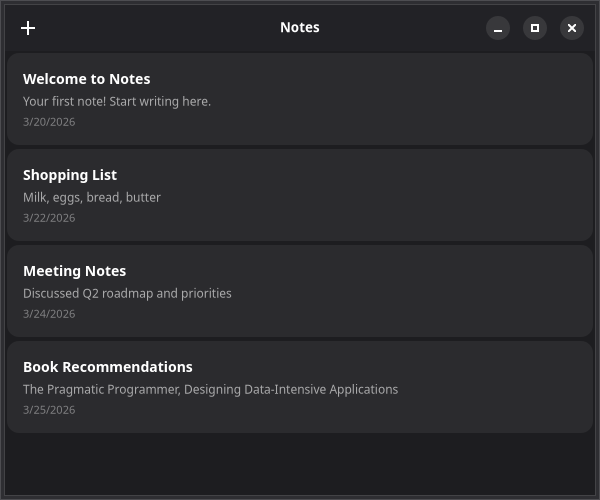
GtkListView
Replace the map() rendering with GtkListView:
tsx
import { GtkListView, GtkScrolledWindow } from "@gtkx/react";
import * as Gtk from "@gtkx/ffi/gtk";

<GtkScrolledWindow vexpand>
    <GtkListView
        estimatedItemHeight={80}
        selectionMode={Gtk.SelectionMode.SINGLE}
        selected={selectedId ? [selectedId] : []}
        onSelectionChanged={(ids) => setSelectedId(ids[0] ?? null)}
        items={notes.map((note) => ({ id: note.id, value: note }))}
        renderItem={(note) => (
            <GtkBox orientation={Gtk.Orientation.VERTICAL} spacing={4} cssClasses={[noteCard]}>
                <GtkLabel label={note.title} halign={Gtk.Align.START} cssClasses={[noteTitle]} />
                <GtkLabel
                    label={note.body || "Empty note"}
                    halign={Gtk.Align.START}
                    cssClasses={[notePreview]}
                    ellipsize={2}
                    lines={1}
                />
                <GtkLabel
                    label={note.createdAt.toLocaleDateString()}
                    halign={Gtk.Align.START}
                    cssClasses={[noteDate]}
                />
            </GtkBox>
        )}
    />
</GtkScrolledWindow>
Key Props
items— Array of{ id: string, value: T }objects. Each item must have a uniqueid.renderItem— Callback that receives the itemvalueand returns a React element.estimatedItemHeight— Approximate height in pixels, used to size the scrollable area before items are measured.selectionMode—NONE,SINGLE,BROWSE, orMULTIPLE.selected/onSelectionChanged— Controlled selection state as an array of IDs.
ColumnView for Tabular Data
For table-like layouts, use GtkColumnView with GtkColumnView.Column compound components:
tsx
import { GtkColumnView, GtkLabel, GtkScrolledWindow } from "@gtkx/react";
import * as Gtk from "@gtkx/ffi/gtk";

const NotesTable = ({ notes }: { notes: Note[] }) => {
    const [sortColumn, setSortColumn] = useState<string | null>("title");
    const [sortOrder, setSortOrder] = useState(Gtk.SortType.ASCENDING);

    const sorted = [...notes].sort((a, b) => {
        if (!sortColumn) return 0;
        const aVal = a[sortColumn as keyof Note];
        const bVal = b[sortColumn as keyof Note];
        const cmp = aVal < bVal ? -1 : aVal > bVal ? 1 : 0;
        return sortOrder === Gtk.SortType.ASCENDING ? cmp : -cmp;
    });

    return (
        <GtkScrolledWindow vexpand hexpand>
            <GtkColumnView
                estimatedRowHeight={48}
                sortColumn={sortColumn}
                sortOrder={sortOrder}
                onSortChanged={(col, order) => {
                    setSortColumn(col);
                    setSortOrder(order);
                }}
                items={sorted.map((n) => ({ id: n.id, value: n }))}
            >
                <GtkColumnView.Column
                    id="title"
                    title="Title"
                    expand
                    resizable
                    sortable
                    renderCell={(note: Note) => (
                        <GtkLabel label={note.title} halign={Gtk.Align.START} />
                    )}
                />
                <GtkColumnView.Column
                    id="createdAt"
                    title="Created"
                    resizable
                    sortable
                    renderCell={(note: Note) => (
                        <GtkLabel label={note.createdAt.toLocaleDateString()} />
                    )}
                />
            </GtkColumnView>
        </GtkScrolledWindow>
    );
};
Tree Lists
For hierarchical data, nest children arrays inside items. This works with GtkListView — no separate tree widget needed:
tsx
const notesWithFolders = [
    {
        id: "personal",
        value: { title: "Personal", type: "folder" as const },
        children: [
            { id: "1", value: { title: "Journal", type: "note" as const } },
            { id: "2", value: { title: "Goals", type: "note" as const } },
        ],
    },
    {
        id: "work",
        value: { title: "Work", type: "folder" as const },
        children: [
            { id: "3", value: { title: "Meeting Notes", type: "note" as const } },
        ],
    },
];

<GtkListView
    estimatedItemHeight={40}
    autoexpand
    items={notesWithFolders}
    renderItem={(item, row) => (
        <GtkBox spacing={8}>
            <GtkImage
                iconName={item.type === "folder" ? "folder-symbolic" : "document-edit-symbolic"}
            />
            <GtkLabel label={item.title} />
        </GtkBox>
    )}
/>;
Items with a children array automatically enable tree behavior. The renderItem callback receives an optional row parameter of type Gtk.TreeListRow | null for accessing expand/collapse state.
Next
In the next chapter, you'll add menus and keyboard shortcuts to the Notes app.