

Develop with Fast Refresh
Restyle the preview while a note stays open, and see what Fast Refresh keeps and when the app restarts instead.
What Fast Refresh keeps
npm run dev watches the project's source files. When you save a component module, Fast Refresh runs the new code and renders its components again in the open window. Everything else stays as it was: React state such as the navigator's open note and the preview toggle in App, and the GTK widgets the edit didn't change, such as the editor with its cursor and undo history.
src/preview/markdown-preview.tsx exports only MarkdownPreview, and its other components are private to the module, so a save refreshes it in place. Saving a module that exports something other than components, such as toMarkup in markup.ts, refreshes the components that import it. The terminal prints Running Fast Refresh... and Fast Refresh complete for each save.
Restyle the preview
Open a note with a quote and a code block. If your folder has none, save this as Meeting notes.md in it:
# Meeting notes

Kickoff with design and docs, Tuesday 10:00.

> Launch when the content is ready, not before.

Preview the new site locally:

```sh
npm install
npm run docs:dev
```
The preview renders the quote as dimmed text and the code block as a plain monospace label. Change CodeBlock and QuoteBlock in src/preview/markdown-preview.tsx, saving after each:
import * as Gtk from "@gtkx/gi/gtk";
import * as Pango from "@gtkx/gi/pango";
import { useTranslation } from "@gtkx/i18n";
import { AdwClamp } from "@gtkx/jsx/adw";
import {
    GtkBox,
    GtkLabel,
    GtkScrolledWindow,
    GtkSeparator,
} from "@gtkx/jsx/gtk";
import type {
    Blockquote,
    Code,
    Heading,
    List,
    Paragraph,
    RootContent,
} from "mdast";
import { fromMarkdown } from "mdast-util-from-markdown";
import { createContext, use, useMemo } from "react";
import { toMarkup } from "./markup.js";

const LinkContext = createContext<(uri: string) => boolean>(() => false);

const HEADING_CLASSES = [
    "title-1",
    "title-2",
    "title-3",
    "title-4",
    "heading",
    "heading",
];

type TextBlockProps = {
    markup: string;
    cssClasses?: string[];
    accessibleRole?: Gtk.AccessibleRole;
};

const TextBlock = ({
    markup,
    cssClasses = [],
    accessibleRole = Gtk.AccessibleRole.LABEL,
}: TextBlockProps) => {
    const onLink = use(LinkContext);

    return (
        <GtkLabel
            accessibleRole={accessibleRole}
            label={markup}
            useMarkup
            wrap
            wrapMode={Pango.WrapMode.WORD_CHAR}
            xalign={0}
            cssClasses={cssClasses}
            onActivateLink={(uri) => onLink(uri)}
        />
    );
};

const HeadingBlock = ({ node }: { node: Heading }) => (
    <TextBlock
        accessibleRole={Gtk.AccessibleRole.HEADING}
        markup={toMarkup(node.children)}
        cssClasses={[HEADING_CLASSES[node.depth - 1] ?? "heading"]}
    />
);

const ParagraphBlock = ({ node }: { node: Paragraph }) => (
    <TextBlock markup={toMarkup(node.children)} />
);

const CodeBlock = ({ node }: { node: Code }) => (
    <GtkBox cssClasses={["card"]}>
        <GtkLabel
            label={node.value}
            selectable
            wrap
            wrapMode={Pango.WrapMode.WORD_CHAR}
            xalign={0}
            hexpand
            marginTop={12}
            marginBottom={12}
            marginStart={12}
            marginEnd={12}
            cssClasses={["monospace"]}
        />
    </GtkBox>
);

const QuoteBlock = ({ node }: { node: Blockquote }) => (
    <GtkBox spacing={12}>
        <GtkSeparator orientation={Gtk.Orientation.VERTICAL} />
        <GtkBox
            orientation={Gtk.Orientation.VERTICAL}
            spacing={12}
            hexpand
            cssClasses={["dimmed"]}
        >
            <Blocks nodes={node.children} />
        </GtkBox>
    </GtkBox>
);

const ListBlock = ({ node }: { node: List }) => (
    <GtkBox
        orientation={Gtk.Orientation.VERTICAL}
        spacing={node.spread ? 12 : 6}
    >
        {node.children.map((item, index) => (
            <GtkBox key={index} spacing={8}>
                <GtkLabel
                    label={node.ordered ? `${(node.start ?? 1) + index}.` : "•"}
                    valign={Gtk.Align.START}
                    widthChars={2}
                    xalign={1}
                />
                <GtkBox
                    orientation={Gtk.Orientation.VERTICAL}
                    spacing={6}
                    hexpand
                >
                    <Blocks nodes={item.children} />
                </GtkBox>
            </GtkBox>
        ))}
    </GtkBox>
);

const Block = ({ node }: { node: RootContent }) => {
    switch (node.type) {
        case "heading":
            return <HeadingBlock node={node} />;
        case "paragraph":
            return <ParagraphBlock node={node} />;
        case "code":
            return <CodeBlock node={node} />;
        case "blockquote":
            return <QuoteBlock node={node} />;
        case "list":
            return <ListBlock node={node} />;
        case "thematicBreak":
            return <GtkSeparator />;
        case "html":
            return (
                <TextBlock
                    markup={toMarkup([node])}
                    cssClasses={["monospace", "dimmed"]}
                />
            );
        default:
            return null;
    }
};

const Blocks = ({ nodes }: { nodes: RootContent[] }) =>
    nodes.map((node, index) => <Block key={index} node={node} />);

type MarkdownPreviewProps = {
    text: string;
    onActivateLink?: (uri: string) => boolean;
};

const MarkdownPreview = ({
    text,
    onActivateLink = () => false,
}: MarkdownPreviewProps) => {
    const { t } = useTranslation();
    const tree = useMemo(() => fromMarkdown(text), [text]);

    return (
        <GtkScrolledWindow vexpand hscrollbarPolicy={Gtk.PolicyType.NEVER}>
            <AdwClamp maximumSize={720}>
                <GtkBox
                    accessibleRole={Gtk.AccessibleRole.DOCUMENT}
                    accessibleLabel={t("Preview")}
                    orientation={Gtk.Orientation.VERTICAL}
                    spacing={12}
                    marginTop={18}
                    marginBottom={18}
                    marginStart={18}
                    marginEnd={18}
                >
                    <LinkContext value={onActivateLink}>
                        <Blocks nodes={tree.children} />
                    </LinkContext>
                </GtkBox>
            </AdwClamp>
        </GtkScrolledWindow>
    );
};

export { MarkdownPreview };CodeBlockputs the label in a box with thecardstyle class, which gives it the rounded background of a boxed list. The margins keep the code clear of the card's edge, andhexpandstretches the label across the card.QuoteBlocksets a verticalGtkSeparatorbeside the quote's blocks, as a bar. The module already importsGtkSeparatorfor thematic breaks.
When the app restarts
Some edits can't be applied to the running app, so gtkx dev relaunches it, and its state starts over: no note is open and the preview is off. The most common one is a change to which modules a file imports. Importing a module the file didn't import before, or dropping one, prints Module imports changed: <path> and Full restart (process restart). Adding a name to an import the file already has, such as another element from @gtkx/jsx/gtk, refreshes as usual.
A component whose hook calls change, for example one that gains a useState, is mounted again with the components inside it, and they lose their state while the rest of the window keeps its own. The app restarts instead of refreshing lists every edit that restarts the app.
Run it
With npm run dev running, open Meeting notes and press the eye button in its header bar. Save each change to markdown-preview.tsx: the code block moves into a card, the quote gets its bar, and the note stays open in the preview.
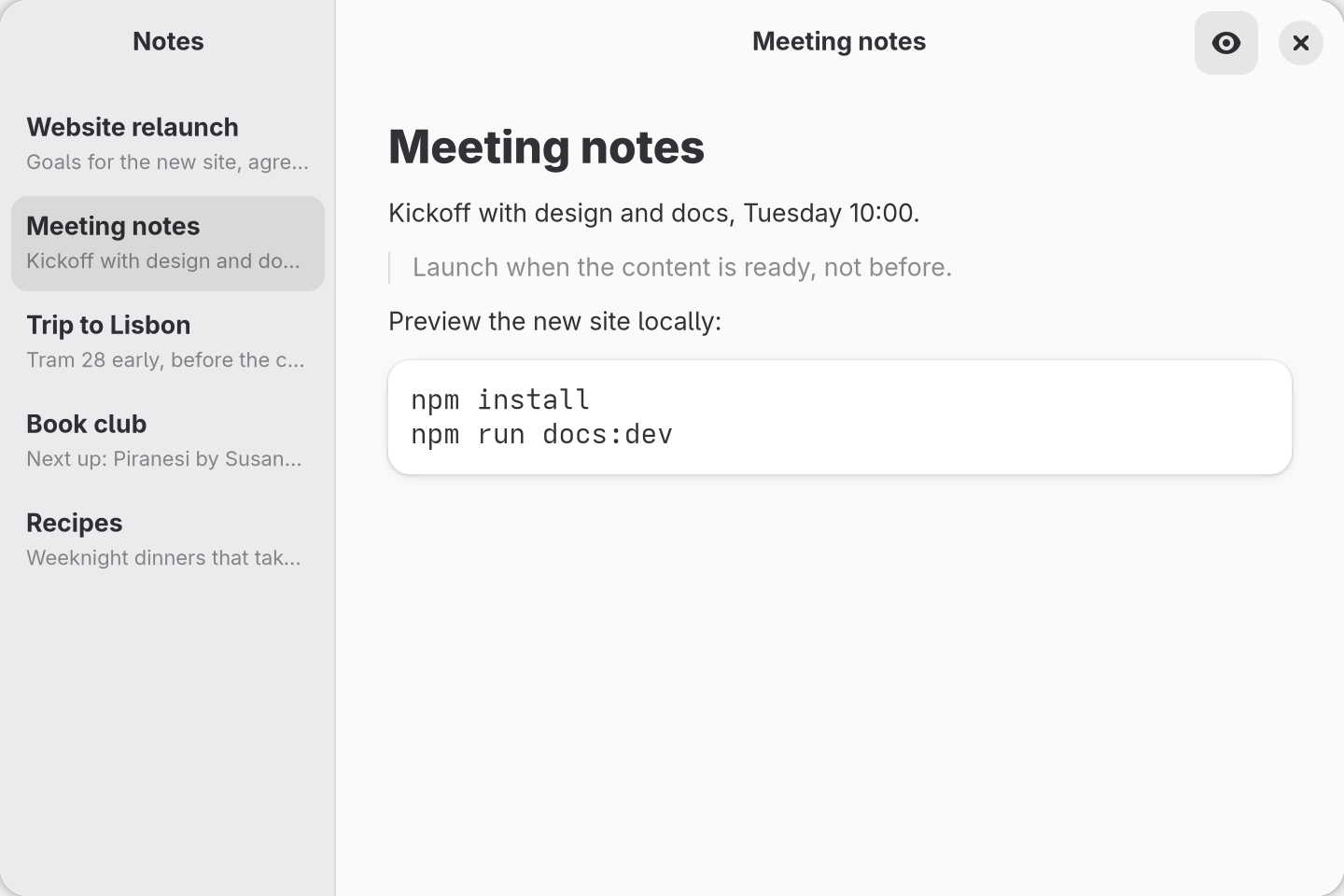
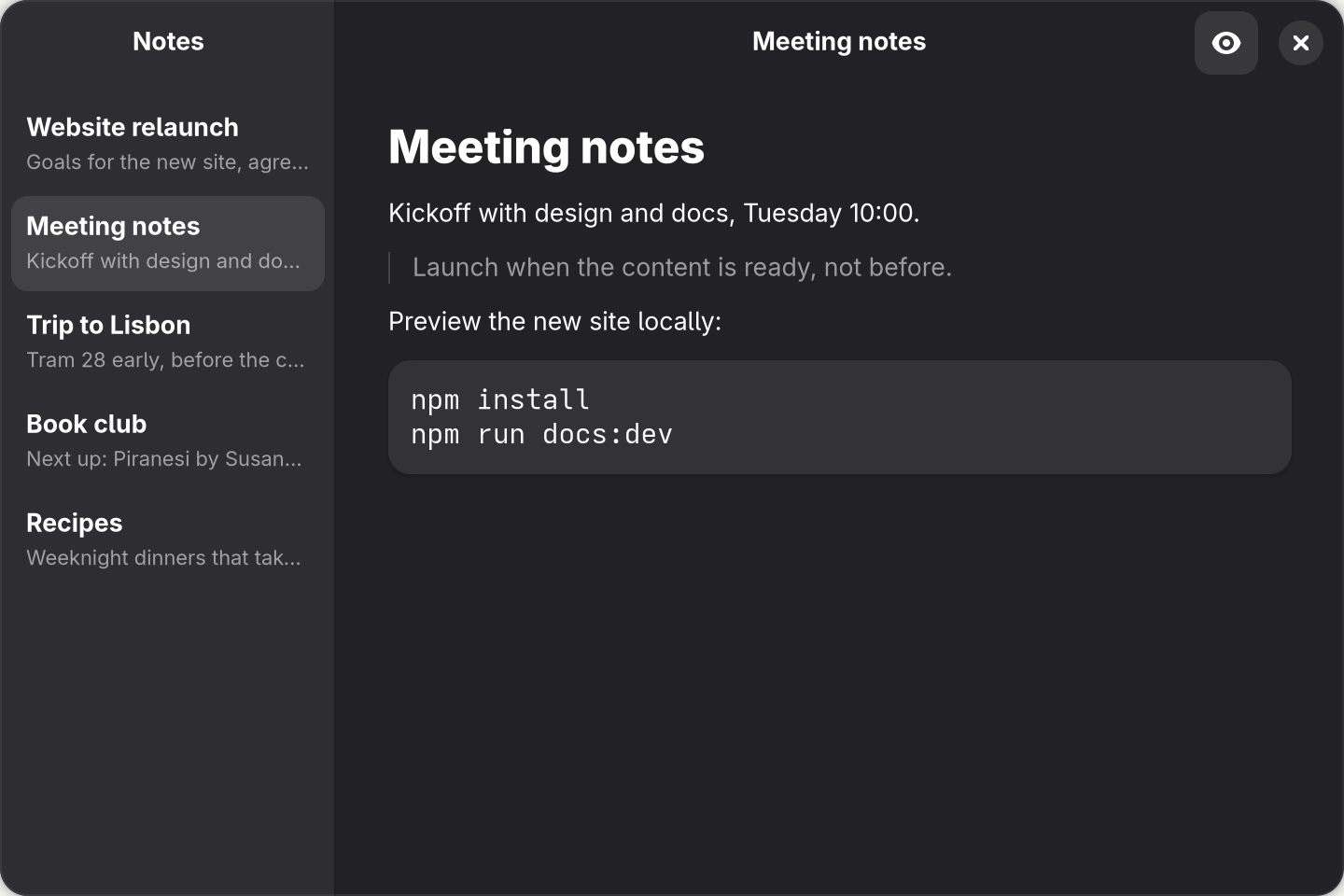
src/preview/markdown-preview.tsx above, after opening Meeting notes and turning on the preview.