

List the Notes
Read the .md files in the notes folder with Node's fs/promises and list them, newest first, in a GTK list view. Each note is a plain file, so any editor or sync tool can change it.
Find the notes folder
Notes keeps its files in a Notes folder inside the user's Documents folder:
import * as GLib from "@gtkx/gi/glib";
import { mkdir, readdir, readFile, stat } from "node:fs/promises";
import { join } from "node:path";
import { type Note, toNote } from "./note.js";

const EXTENSION = ".md";

const defaultFolder = (): string =>
    join(
        GLib.getUserSpecialDir(GLib.UserDirectory.DIRECTORY_DOCUMENTS) ??
            GLib.getHomeDir(),
        "Notes",
    );

const noteName = (fileName: string): string | null =>
    fileName.endsWith(EXTENSION) && !fileName.startsWith(".")
        ? fileName.slice(0, -EXTENSION.length)
        : null;

const readNote = async (folder: string, name: string): Promise<Note | null> => {
    const path = join(folder, `${name}${EXTENSION}`);
    const info = await stat(path);
    if (!info.isFile()) {
        return null;
    }

    return toNote(name, await readFile(path, "utf8"), info.mtimeMs);
};

const readNotes = async (folder: string): Promise<Note[]> => {
    await mkdir(folder, { recursive: true });
    const names = (await readdir(folder))
        .map(noteName)
        .filter((name) => name !== null);
    const notes = await Promise.all(
        names.map((name) => readNote(folder, name)),
    );

    return notes.filter((note) => note !== null);
};

export { defaultFolder, readNotes };
GLib.getUserSpecialDir returns the Documents folder set in user-dirs.dirs, which the desktop may have localized or moved, or null when there is none; Notes then uses the home folder. @gtkx/gi/glib holds the GLib bindings, generated like the elements in @gtkx/jsx.
The rest is ordinary Node.js code, since a GTKX app is a Node.js program (Why Node.js). readNotes creates the folder on first launch, keeps the visible .md files, and reads them in parallel. readNote calls stat before reading a file, which gives its modification time and skips anything that isn't a file, such as a folder named something.md.
Read the notes
A Note is the file's name without .md, its text, its modification time in milliseconds, and an excerpt for the list:
type Note = {
    name: string;
    text: string;
    modified: number;
    excerpt: string;
};

const firstLine = (text: string): string =>
    text
        .split("\n")
        .map((line) => line.trim())
        .find((line) => line !== "" && !line.startsWith("#")) ?? "";

const toNote = (name: string, text: string, modified: number): Note => ({
    name,
    text,
    modified,
    excerpt: firstLine(text),
});

export { type Note, toNote };
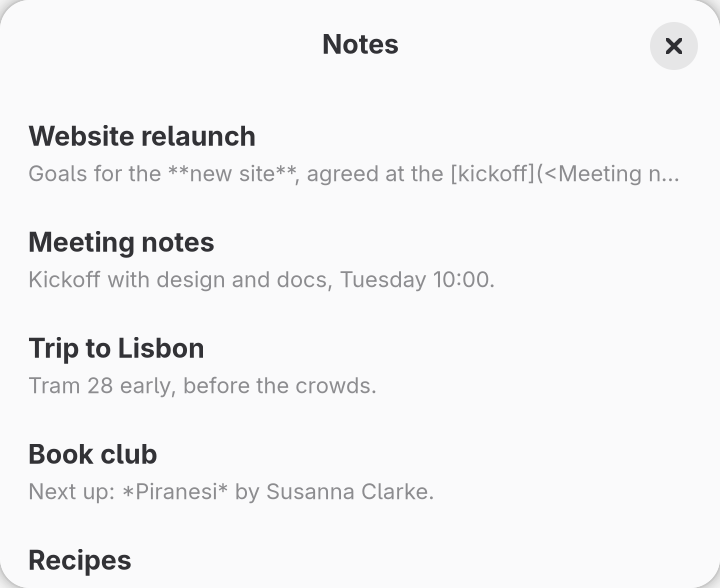
The excerpt is the first line that is neither empty nor a heading, as written, so Markdown such as **bold** shows its asterisks. Render the Preview parses the Markdown and takes the excerpt from the parsed text instead.
Share the notes
The list, and later the editor and search, need the same notes. A context provider loads them once for a folder:
import { createContext, type ReactNode, use, useEffect, useState } from "react";
import { readNotes } from "./files.js";
import type { Note } from "./note.js";

type NoteMap = ReadonlyMap<string, Note>;

type NotesValue = {
    folder: string;
    notes: NoteMap | null;
};

const NotesContext = createContext<NotesValue | null>(null);

const NotesProvider = ({
    folder,
    children,
}: {
    folder: string;
    children: ReactNode;
}) => {
    const [notes, setNotes] = useState<NoteMap | null>(null);

    useEffect(() => {
        const controller = new AbortController();

        const load = async (): Promise<void> => {
            const list = await readNotes(folder);
            if (!controller.signal.aborted) {
                setNotes(new Map(list.map((note) => [note.name, note])));
            }
        };

        void load();

        return () => controller.abort();
    }, [folder]);

    return <NotesContext value={{ folder, notes }}>{children}</NotesContext>;
};

const useNotes = (): NotesValue => {
    const value = use(NotesContext);
    if (value === null) {
        throw new Error("NotesProvider is required");
    }

    return value;
};

export { NotesProvider, useNotes };
notes is null until the folder has loaded, then a map from each note's name to the note. The effect aborts on cleanup, so a read that finishes after the provider unmounts, or after folder changes, sets no state. useNotes reads the context with React's use and throws outside the provider.
List the notes
Install @gtkx/components, which renders GTK's list widgets from data:
npm install @gtkx/components@betaThe notes screen shows a spinner while the folder loads, the empty state from Create a Window when it has no notes, and otherwise a list of every note, newest first:
import { ListView } from "@gtkx/components";
import * as Gtk from "@gtkx/gi/gtk";
import * as Pango from "@gtkx/gi/pango";
import { useTranslation } from "@gtkx/i18n";
import { AdwSpinner, AdwStatusPage } from "@gtkx/jsx/adw";
import { GtkBox, GtkLabel, GtkScrolledWindow } from "@gtkx/jsx/gtk";
import type { Note } from "../notes/note.js";
import { useNotes } from "../notes/notes-provider.js";

const NoteRow = ({ note }: { note: Note }) => (
    <GtkBox
        orientation={Gtk.Orientation.VERTICAL}
        spacing={2}
        marginTop={8}
        marginBottom={8}
    >
        <GtkLabel
            label={note.name}
            xalign={0}
            ellipsize={Pango.EllipsizeMode.END}
            cssClasses={["heading"]}
        />
        <GtkLabel
            label={note.excerpt}
            xalign={0}
            ellipsize={Pango.EllipsizeMode.END}
            singleLineMode
            cssClasses={["dimmed", "caption"]}
        />
    </GtkBox>
);

const NotesScreen = () => {
    const { t } = useTranslation();
    const { notes } = useNotes();

    if (notes === null) {
        return <AdwSpinner />;
    }

    if (notes.size === 0) {
        return (
            <AdwStatusPage
                iconName="document-new-symbolic"
                title={t("No Notes")}
                description={t("Notes are Markdown files in your notes folder")}
            />
        );
    }

    const shown = [...notes.values()].sort((a, b) => b.modified - a.modified);

    return (
        <GtkScrolledWindow hscrollbarPolicy={Gtk.PolicyType.NEVER}>
            <ListView<Note>
                items={shown.map((note) => ({ id: note.name, value: note }))}
                isFlat
                cssClasses={["navigation-sidebar"]}
                rowProps={({ item }) => ({ accessibleLabel: item.name })}
                renderItem={({ item }) => <NoteRow note={item} />}
            />
        </GtkScrolledWindow>
    );
};

export { NotesScreen };ListViewtakesitemsas{ id, value }pairs and arenderItemfor each row. The note's name is its ID, which is unique within a folder. List components covers selection and how IDs keep rows' state.isFlatsays no item has children, so the list skips looking for a tree.- GTK names a list row from its own accessible label, not from its content, so
rowPropslabels each row with the note's name. Screen readers announce it, and Test the App finds rows by it. - The
navigation-sidebarstyle class gives the rows Adwaita's sidebar look, and theheading,dimmedandcaptionclasses style the labels; see Style classes. Both labels end in an ellipsis when the window is too narrow, and the scrolled window never scrolls sideways.
The app wraps the toolbar view in the provider and shows the screen in place of the status page:
import { useTranslation } from "@gtkx/i18n";
import {
    AdwApplication,
    AdwApplicationWindow,
    AdwHeaderBar,
    AdwToolbarView,
} from "@gtkx/jsx/adw";
import { quit } from "@gtkx/react";
import { NotesScreen } from "./components/notes-screen.js";
import { defaultFolder } from "./notes/files.js";
import { NotesProvider } from "./notes/notes-provider.js";

function App() {
    const { t } = useTranslation();

    return (
        <AdwApplication>
            <AdwApplicationWindow
                title={t("Notes")}
                widthRequest={360}
                heightRequest={294}
                onCloseRequest={() => quit()}
            >
                <NotesProvider folder={defaultFolder()}>
                    <AdwToolbarView top={<AdwHeaderBar />}>
                        <NotesScreen />
                    </AdwToolbarView>
                </NotesProvider>
            </AdwApplicationWindow>
        </AdwApplication>
    );
}

export { App };
Run it
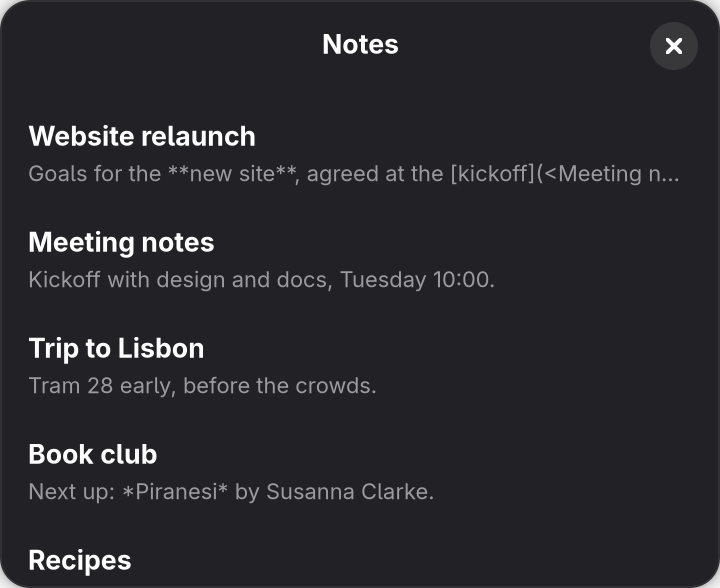
Save the files. The new imports restart the app, which creates the notes folder if it is missing and shows the empty state. Add a few .md files to the folder, ~/Documents/Notes on most desktops, then close the window and run npm run dev again: the app reads the folder only when it starts until Save and Watch Files watches it. The window lists the notes, newest first.
src/app.tsx above.