

Filter by Tag
Read tags from each note's YAML front matter and filter the list by tag.
Parse front matter
Tags live in the note file itself, in a block of YAML between two --- lines at the top, so the notes folder stays plain Markdown that any editor can open. Install yaml to parse the block; it ships its own types:
npm install yamlsrc/notes/note.ts splits each file into its front matter and its body:
import type { Nodes, PhrasingContent } from "mdast";
import { fromMarkdown } from "mdast-util-from-markdown";
import { parse } from "yaml";
type Note = {
name: string;
text: string;
modified: number;
body: string;
tags: string[];
excerpt: string;
};
const FRONT_MATTER = /^---\r?\n(?:([\s\S]*?)\r?\n)?---[ \t]*(?:\r?\n|$)/;
FRONT_MATTERmatches only at the very start of the file: a---line, the YAML, and a closing---line. A file without the block has no tags, and its body is the whole text.parsethrows on YAML it can't read.parseYamlturns the error intonull, so a note with a broken block still loads, with no tags.toTagsaccepts a list (tags: [home, reading]) or a single tag (tags: home), removes duplicates, and skips values that aren't strings, such as2026, which YAML reads as a number. It also drops a leading#, sohomeand#homeare the same tag. A#after a space starts a YAML comment, so a tag written with one must be quoted:tags: "#home".bodyis the text after the block. The excerpt and the preview read it, while the editor, the saver and the search keep using the wholetext.
Filter the list
src/components/notes-screen.tsx adds a drop-down of tags under the search entry:
import { DropDown, ListView } from "@gtkx/components";
import * as Gtk from "@gtkx/gi/gtk";
import * as Pango from "@gtkx/gi/pango";
import { useTranslation } from "@gtkx/i18n";
import { AdwSpinner, AdwStatusPage } from "@gtkx/jsx/adw";
import {
GtkBox,
GtkCallbackAction,
GtkLabel,
GtkScrolledWindow,
GtkSearchEntry,
GtkShortcut,
GtkShortcutController,
GtkShortcutTrigger,
} from "@gtkx/jsx/gtk";
import type { SplitViewScreenProps } from "@gtkx/navigation";
import { useState } from "react";
import { type RootParamList, useOpenNoteName } from "../navigation.js";
import type { Note } from "../notes/note.js";
import { useNotes } from "../notes/notes-provider.js";
import { useNoteSearch } from "../search/use-note-search.js";
const ALL_NOTES = "";
allTagscollects the tags of every note once, sorted alphabetically.TagFilterrenders aDropDownfrom@gtkx/components. Its items are "All Notes" followed by each tag. The values are strings, so the drop-down shows them as labels without arenderItem. Selection works by item ID, and "All Notes" takes the empty string, which no tag can be becausetoTagsdrops empty ones. The tooltip says what the drop-down is for, since it shows only the current choice.selectedTagis what the user chose, andtagis what the list uses. When the chosen tag no longer exists, for example after you edit it out of the last note that had it,tagfalls back to all notes, and passing it asselectedIdmoves the drop-down back to "All Notes".- The tag and the search apply together: a note shows when it has the tag and matches the query. The search indexes each note's whole text, front matter included, so searching for a tag name also finds its notes.
- The drop-down renders only when some note has a tag, so a folder without front matter looks as before. The search entry and the drop-down share a box, which takes over the entry's margins.
Show tags in the preview
Until now the preview rendered the whole file, so a front matter block showed as a horizontal rule above a heading made of the YAML. The note screen now passes the preview the note's body and its tags:
import * as Gtk from "@gtkx/gi/gtk";
import { useTranslation } from "@gtkx/i18n";
import { AdwStatusPage } from "@gtkx/jsx/adw";
import { GtkStack, GtkStackPage } from "@gtkx/jsx/gtk";
import type { SplitViewScreenProps } from "@gtkx/navigation";
import { NoteEditor } from "../editor/note-editor.js";
import type { RootParamList } from "../navigation.js";
import { linkedNoteName } from "../notes/files.js";
import { useNotes } from "../notes/notes-provider.js";
import { MarkdownPreview } from "../preview/markdown-preview.js";

type NoteScreenProps = SplitViewScreenProps<RootParamList, "Note"> & {
    preview: boolean;
};

const NoteScreen = ({ route, navigation, preview }: NoteScreenProps) => {
    const { t } = useTranslation();
    const { notes, edit } = useNotes();
    const { name } = route.params;
    const note = notes?.get(name);

    const openLinkedNote = (uri: string): boolean => {
        const linked = linkedNoteName(uri);
        if (linked === null) {
            return false;
        }
        navigation.navigate("Note", { name: linked });

        return true;
    };

    if (note === undefined) {
        return (
            <AdwStatusPage
                iconName="edit-find-symbolic"
                title={t("Note Not Found")}
            />
        );
    }

    return (
        <GtkStack
            visibleChildName={preview ? "preview" : "editor"}
            transitionType={Gtk.StackTransitionType.CROSSFADE}
        >
            <GtkStackPage name="editor">
                <NoteEditor
                    key={name}
                    text={note.text}
                    onChange={(text) => edit(name, text)}
                />
            </GtkStackPage>
            <GtkStackPage name="preview">
                <MarkdownPreview
                    text={note.body}
                    tags={note.tags}
                    onActivateLink={openLinkedNote}
                />
            </GtkStackPage>
        </GtkStack>
    );
};

export { NoteScreen };
The editor still gets note.text, so the front matter stays editable.
MarkdownPreview, in src/preview/markdown-preview.tsx, shows the tags above the body:
import * as Gtk from "@gtkx/gi/gtk";
import * as Pango from "@gtkx/gi/pango";
import { useTranslation } from "@gtkx/i18n";
import { AdwClamp } from "@gtkx/jsx/adw";
import {
GtkBox,
GtkLabel,
GtkScrolledWindow,
GtkSeparator,
} from "@gtkx/jsx/gtk";
import type {
Blockquote,
Code,
Heading,
List,
Paragraph,
RootContent,
} from "mdast";
import { fromMarkdown } from "mdast-util-from-markdown";
import { createContext, use, useMemo } from "react";
import { toMarkup } from "./markup.js";
const LinkContext = createContext<(uri: string) => boolean>(() => false);
const HEADING_CLASSES = [
"title-1",
"title-2",
"title-3",
"title-4",
"heading",
"heading",
];
type TextBlockProps = {
markup: string;
cssClasses?: string[];
accessibleRole?: Gtk.AccessibleRole;
};
const TextBlock = ({
markup,
cssClasses = [],
accessibleRole = Gtk.AccessibleRole.LABEL,
}: TextBlockProps) => {
const onLink = use(LinkContext);
return (
<GtkLabel
accessibleRole={accessibleRole}
label={markup}
useMarkup
wrap
wrapMode={Pango.WrapMode.WORD_CHAR}
xalign={0}
cssClasses={cssClasses}
onActivateLink={(uri) => onLink(uri)}
/>
);
};
const HeadingBlock = ({ node }: { node: Heading }) => (
<TextBlock
accessibleRole={Gtk.AccessibleRole.HEADING}
markup={toMarkup(node.children)}
cssClasses={[HEADING_CLASSES[node.depth - 1] ?? "heading"]}
/>
);
const ParagraphBlock = ({ node }: { node: Paragraph }) => (
<TextBlock markup={toMarkup(node.children)} />
);
const CodeBlock = ({ node }: { node: Code }) => (
<GtkBox cssClasses={["card"]}>
<GtkLabel
label={node.value}
selectable
wrap
wrapMode={Pango.WrapMode.WORD_CHAR}
xalign={0}
hexpand
marginTop={12}
marginBottom={12}
marginStart={12}
marginEnd={12}
cssClasses={["monospace"]}
/>
</GtkBox>
);
const QuoteBlock = ({ node }: { node: Blockquote }) => (
<GtkBox spacing={12}>
<GtkSeparator orientation={Gtk.Orientation.VERTICAL} />
<GtkBox
orientation={Gtk.Orientation.VERTICAL}
spacing={12}
hexpand
cssClasses={["dimmed"]}
>
<Blocks nodes={node.children} />
</GtkBox>
</GtkBox>
);
const ListBlock = ({ node }: { node: List }) => (
<GtkBox
orientation={Gtk.Orientation.VERTICAL}
spacing={node.spread ? 12 : 6}
>
{node.children.map((item, index) => (
<GtkBox key={index} spacing={8}>
<GtkLabel
label={node.ordered ? `${(node.start ?? 1) + index}.` : "•"}
valign={Gtk.Align.START}
widthChars={2}
xalign={1}
/>
<GtkBox
orientation={Gtk.Orientation.VERTICAL}
spacing={6}
hexpand
>
<Blocks nodes={item.children} />
</GtkBox>
</GtkBox>
))}
</GtkBox>
);
const Block = ({ node }: { node: RootContent }) => {
switch (node.type) {
case "heading":
return <HeadingBlock node={node} />;
case "paragraph":
return <ParagraphBlock node={node} />;
case "code":
return <CodeBlock node={node} />;
case "blockquote":
return <QuoteBlock node={node} />;
case "list":
return <ListBlock node={node} />;
case "thematicBreak":
return <GtkSeparator />;
case "html":
return (
<TextBlock
markup={toMarkup([node])}
cssClasses={["monospace", "dimmed"]}
/>
);
default:
return null;
}
};
const Blocks = ({ nodes }: { nodes: RootContent[] }) =>
nodes.map((node, index) => <Block key={index} node={node} />);
const Tags = ({ tags }: { tags: string[] }) => (
<GtkBox spacing={12}>
{tags.map((tag) => (
<GtkLabel
key={tag}
label={`#${tag}`}
cssClasses={["caption-heading", "accent"]}
/>
))}
</GtkBox>
);
Tags renders a row of labels with libadwaita's caption-heading and accent style classes. The tags prop is optional and defaults to an empty list, which renders no row.
Run it
Add front matter to a few notes. Give Book club.md a list:
---
tags: [home, reading]
---
# Book club

Next up: *Piranesi* by Susanna Clarke.
and put a block with a single tag at the top of Recipes.md:
---
tags: home
---
The drop-down appears under the search entry. Choose #home, and the list narrows to Book club and Recipes. Open Book club and switch to the preview: its tags show above the heading, and the front matter doesn't.
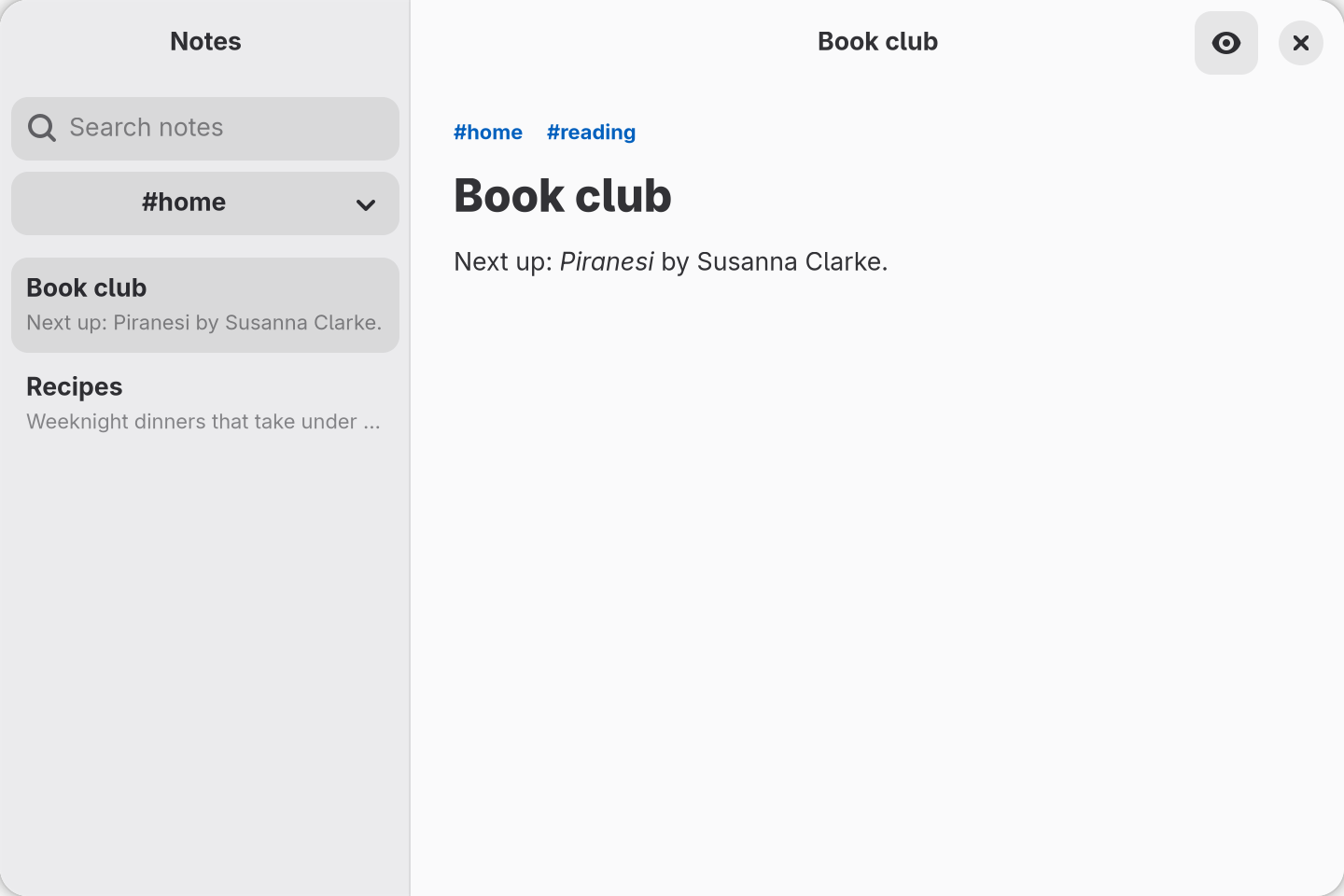
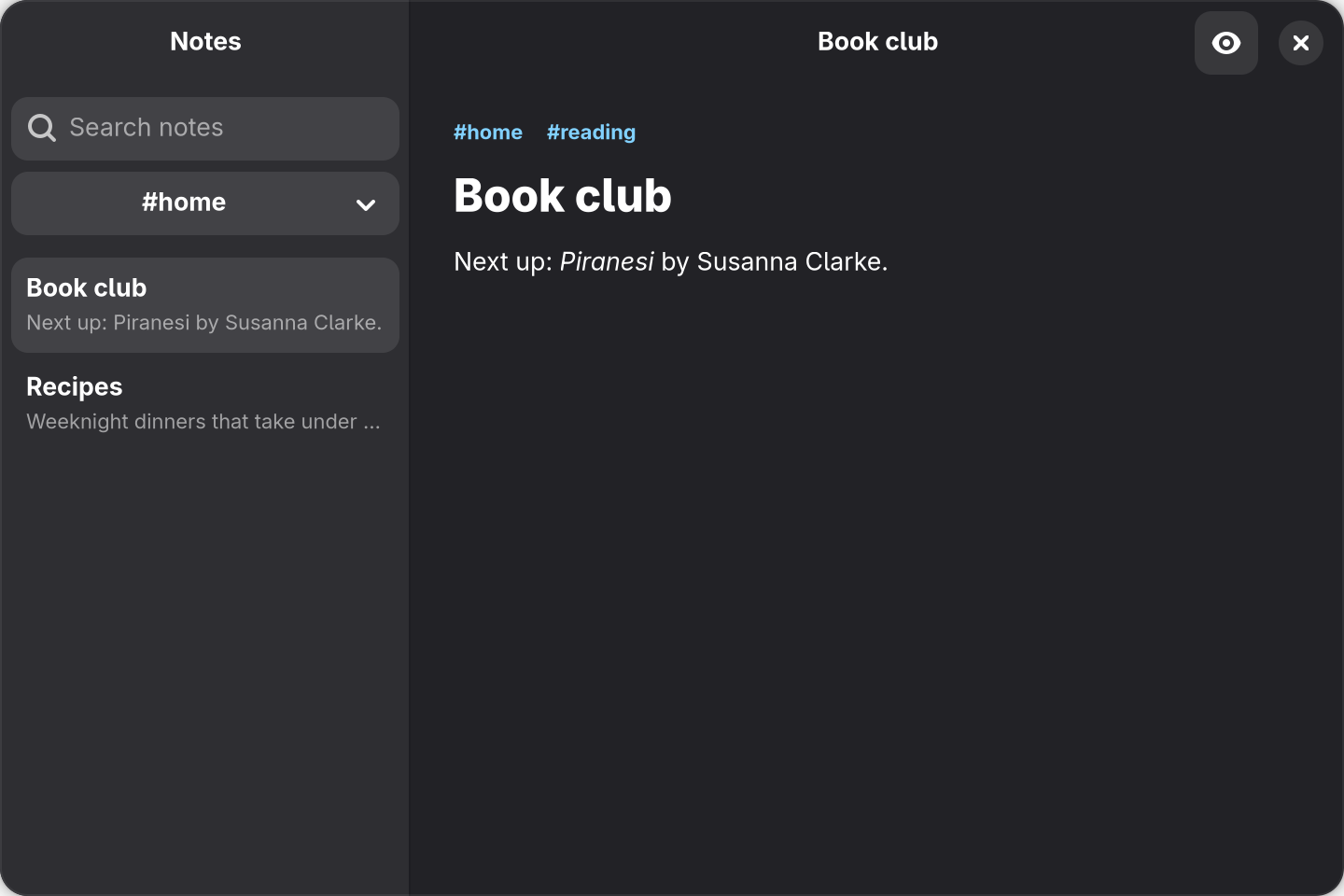
src/components/notes-screen.tsx and src/preview/markdown-preview.tsx above, with #home chosen and Book club open in the preview.