

Edit a Note
Open the selected note in a Markdown editor beside the list. The editor comes from GtkSourceView, a library outside the set GTKX generates bindings for by default, so the chapter starts by adding it.
Add GtkSourceView
GTKX generates bindings for Adwaita, GTK and the libraries they depend on. Codegen reads each library's GIR file, which its development package installs. On Fedora, install GtkSourceView's; other distributions have an equivalent package:
sudo dnf install gtksourceview5-develList the library by GIR name and version in gtkx.config.ts, at the top of the object defineConfig receives:
export default defineConfig({
    libraries: ["GtkSource-5"],
    applicationId: "dev.gtkx.Notes",
Then generate the bindings:
npm run codegenThis adds @gtkx/gi/gtksource, with GtkSourceView's classes and functions, and @gtkx/jsx/gtksource, with its elements. gtkx dev also regenerates the bindings whenever gtkx.config.ts changes. The config file covers libraries and GIR files outside the standard search paths.
Two screens in a split view
Install @gtkx/navigation, which renders React Navigation navigators with Adwaita widgets, and @react-navigation/core, whose types the app extends:
npm install @gtkx/navigation@beta @react-navigation/core@^7A split view navigator keeps its first screen in the sidebar and shows the others in the content pane. src/navigation.ts declares the screens:
import { createSplitViewNavigator, useNavigationState } from "@gtkx/navigation";

type RootParamList = {
    Notes: undefined;
    Note: { name: string };
};

const Split = createSplitViewNavigator<RootParamList>();

type RootNavigatorType = typeof Split;

declare module "@react-navigation/core" {
    interface RootNavigator extends RootNavigatorType {}
}

const useOpenNoteName = (): string | null =>
    useNavigationState<RootParamList, string | null>((state) => {
        const route = state.routes.at(-1);

        return route?.name === "Note" ? (route.params?.name ?? null) : null;
    });

export { type RootParamList, Split, useOpenNoteName };RootParamListmaps each screen to its route parameters: theNoteslist takes none, and aNotetakes the note's name.- The
declare moduleblock registers the navigator as the app's root, which typesuseNavigation()and route parameters everywhere. TypeScript augments only a module it can resolve, which is why@react-navigation/coreis installed directly; see Typing the root param list. useOpenNoteNamereads the navigation state withuseNavigationState, which@gtkx/navigationre-exports. The last route is the open page: aNoteroute gives that note's name, and the sidebar's own route, when no note is open, givesnull.
The window renders the navigator inside a NavigationContainer, within the notes provider so both screens read the same notes:
import { useTranslation } from "@gtkx/i18n";
import {
    AdwApplication,
    AdwApplicationWindow,
    AdwStatusPage,
} from "@gtkx/jsx/adw";
import { NavigationContainer } from "@gtkx/navigation";
import { quit } from "@gtkx/react";
import { NoteScreen } from "./components/note-screen.js";
import { NotesScreen } from "./components/notes-screen.js";
import { Split } from "./navigation.js";
import { defaultFolder } from "./notes/files.js";
import { NotesProvider } from "./notes/notes-provider.js";

function App() {
    const { t } = useTranslation();

    return (
        <AdwApplication>
            <AdwApplicationWindow
                title={t("Notes")}
                defaultWidth={720}
                defaultHeight={480}
                widthRequest={360}
                heightRequest={294}
                onCloseRequest={() => quit()}
            >
                <NotesProvider folder={defaultFolder()}>
                    <NavigationContainer>
                        <Split.Navigator
                            contentPlaceholder={
                                <AdwStatusPage
                                    iconName="document-edit-symbolic"
                                    title={t("No Note Selected")}
                                />
                            }
                        >
                            <Split.Screen
                                name="Notes"
                                component={NotesScreen}
                                options={{ title: t("Notes") }}
                            />
                            <Split.Screen
                                name="Note"
                                component={NoteScreen}
                                options={({ route }) => ({
                                    title: route.params.name,
                                })}
                            />
                        </Split.Navigator>
                    </NavigationContainer>
                </NotesProvider>
            </AdwApplicationWindow>
        </AdwApplication>
    );
}

export { App };NavigationContainerholds the navigation state; NavigationContainer covers what else it accepts.contentPlaceholderfills the content pane until a note opens.- Each screen's
titlenames its header bar: Notes over the sidebar, and the note's name, read from the route, over the editor. The navigator gives the sidebar and the content pane their own header bars, so the toolbar view from Create a Window is gone. - The window opens at 720 by 480, wide enough for both panes. Adapt the Layout stacks them in narrow windows.
Select the open note
The list now selects a row, and the selection follows the route:
import { ListView } from "@gtkx/components";
import * as Gtk from "@gtkx/gi/gtk";
import * as Pango from "@gtkx/gi/pango";
import { useTranslation } from "@gtkx/i18n";
import { AdwSpinner, AdwStatusPage } from "@gtkx/jsx/adw";
import { GtkBox, GtkLabel, GtkScrolledWindow } from "@gtkx/jsx/gtk";
import type { SplitViewScreenProps } from "@gtkx/navigation";
import { type RootParamList, useOpenNoteName } from "../navigation.js";
import type { Note } from "../notes/note.js";
import { useNotes } from "../notes/notes-provider.js";

const NoteRow = ({ note }: { note: Note }) => (
    <GtkBox
        orientation={Gtk.Orientation.VERTICAL}
        spacing={2}
        marginTop={8}
        marginBottom={8}
    >
        <GtkLabel
            label={note.name}
            xalign={0}
            ellipsize={Pango.EllipsizeMode.END}
            cssClasses={["heading"]}
        />
        <GtkLabel
            label={note.excerpt}
            xalign={0}
            ellipsize={Pango.EllipsizeMode.END}
            singleLineMode
            cssClasses={["dimmed", "caption"]}
        />
    </GtkBox>
);

const NotesScreen = ({
    navigation,
}: SplitViewScreenProps<RootParamList, "Notes">) => {
    const { t } = useTranslation();
    const { notes } = useNotes();
    const openName = useOpenNoteName();

    if (notes === null) {
        return <AdwSpinner />;
    }

    if (notes.size === 0) {
        return (
            <AdwStatusPage
                iconName="document-new-symbolic"
                title={t("No Notes")}
                description={t("Notes are Markdown files in your notes folder")}
                cssClasses={["compact"]}
            />
        );
    }

    const shown = [...notes.values()].sort((a, b) => b.modified - a.modified);

    return (
        <GtkScrolledWindow hscrollbarPolicy={Gtk.PolicyType.NEVER}>
            <ListView<Note>
                items={shown.map((note) => ({ id: note.name, value: note }))}
                isFlat
                cssClasses={["navigation-sidebar"]}
                selectionMode={Gtk.SelectionMode.SINGLE}
                selectedIds={openName === null ? [] : [openName]}
                onSelectionChanged={([name]) => {
                    if (name !== undefined) {
                        navigation.navigate("Note", { name });
                    }
                }}
                rowProps={({ item }) => ({ accessibleLabel: item.name })}
                renderItem={({ item }) => <NoteRow note={item} />}
            />
        </GtkScrolledWindow>
    );
};

export { NotesScreen };selectedIdsholds the open note's name, so the highlighted row matches the content pane however the note was opened.onSelectionChangedreports the row the user picks, andnavigateopens that note. Instead of keeping the selection in state, the handler changes the route, and the route selects the row. In a split view,navigatereplaces the open note rather than stacking another page above it; see Split view navigator.- The empty state's
compactstyle class fits the status page into the narrow sidebar, as libadwaita'sAdwStatusPagerecommends.
The editor
The editor shows a note's text in a GtkSourceView, a text view that highlights syntax:
import * as Adw from "@gtkx/gi/adw";
import * as Gtk from "@gtkx/gi/gtk";
import * as GtkSource from "@gtkx/gi/gtksource";
import { useTranslation } from "@gtkx/i18n";
import { GtkScrolledWindow } from "@gtkx/jsx/gtk";
import { GtkSourceBuffer, GtkSourceView } from "@gtkx/jsx/gtksource";
import { useProperty } from "@gtkx/react";

const markdown = GtkSource.LanguageManager.getDefault().getLanguage("markdown");

const NoteEditor = ({ text }: { text: string }) => {
    const { t } = useTranslation();
    const isDark = useProperty(Adw.StyleManager.getDefault(), "dark");
    const styleScheme = GtkSource.StyleSchemeManager.getDefault().getScheme(
        isDark ? "Adwaita-dark" : "Adwaita",
    );

    return (
        <GtkScrolledWindow vexpand hscrollbarPolicy={Gtk.PolicyType.NEVER}>
            <GtkSourceView
                accessibleLabel={t("Note text")}
                wrapMode={Gtk.WrapMode.WORD_CHAR}
                topMargin={18}
                bottomMargin={18}
                leftMargin={18}
                rightMargin={18}
                buffer={
                    <GtkSourceBuffer
                        text={text}
                        language={markdown}
                        styleScheme={styleScheme}
                    />
                }
            />
        </GtkScrolledWindow>
    );
};

export { NoteEditor };- The view's
bufferprop takes aGtkSourceBufferelement, which holds the text, its language and its colors. Object properties accept elements, as The JSX prop model describes. getLanguage("markdown")loads GtkSourceView's Markdown definition once, when the module loads. Importing@gtkx/gi/gtksourcehas already initialized the library; see Library initialization.- GtkSourceView includes
AdwaitaandAdwaita-darkstyle schemes, which match the app's light and dark styles.usePropertyfollows the style manager'sdarkproperty and re-renders when it changes, so the buffer switches scheme with the system; see Following a property. accessibleLabelnames the text view for screen readers. Test the App finds the editor by it.wrapModewraps long lines at word boundaries, or between characters for a word longer than the line. The margins keep the text off the pane's edges.
The note screen looks up the note named in the route and opens it in the editor:
import { useTranslation } from "@gtkx/i18n";
import { AdwStatusPage } from "@gtkx/jsx/adw";
import type { SplitViewScreenProps } from "@gtkx/navigation";
import { NoteEditor } from "../editor/note-editor.js";
import type { RootParamList } from "../navigation.js";
import { useNotes } from "../notes/notes-provider.js";

const NoteScreen = ({ route }: SplitViewScreenProps<RootParamList, "Note">) => {
    const { t } = useTranslation();
    const { notes } = useNotes();
    const { name } = route.params;
    const note = notes?.get(name);

    if (note === undefined) {
        return (
            <AdwStatusPage
                iconName="edit-find-symbolic"
                title={t("Note Not Found")}
            />
        );
    }

    return <NoteEditor key={name} text={note.text} />;
};

export { NoteScreen };
key={name} gives each note its own editor: without it, opening another note would reuse the previous note's view, with its cursor and scroll position. A route that names a note the folder doesn't have shows a status page instead.
Run it
Save the files. The config change regenerates the bindings and the new imports restart the app. The window opens with the list in the sidebar and No Note Selected beside it.
Click a note in the list. Its Markdown opens beside the list with syntax highlighting, in the dark scheme when the system prefers dark. Edits stay in the editor until Save and Watch Files saves them.
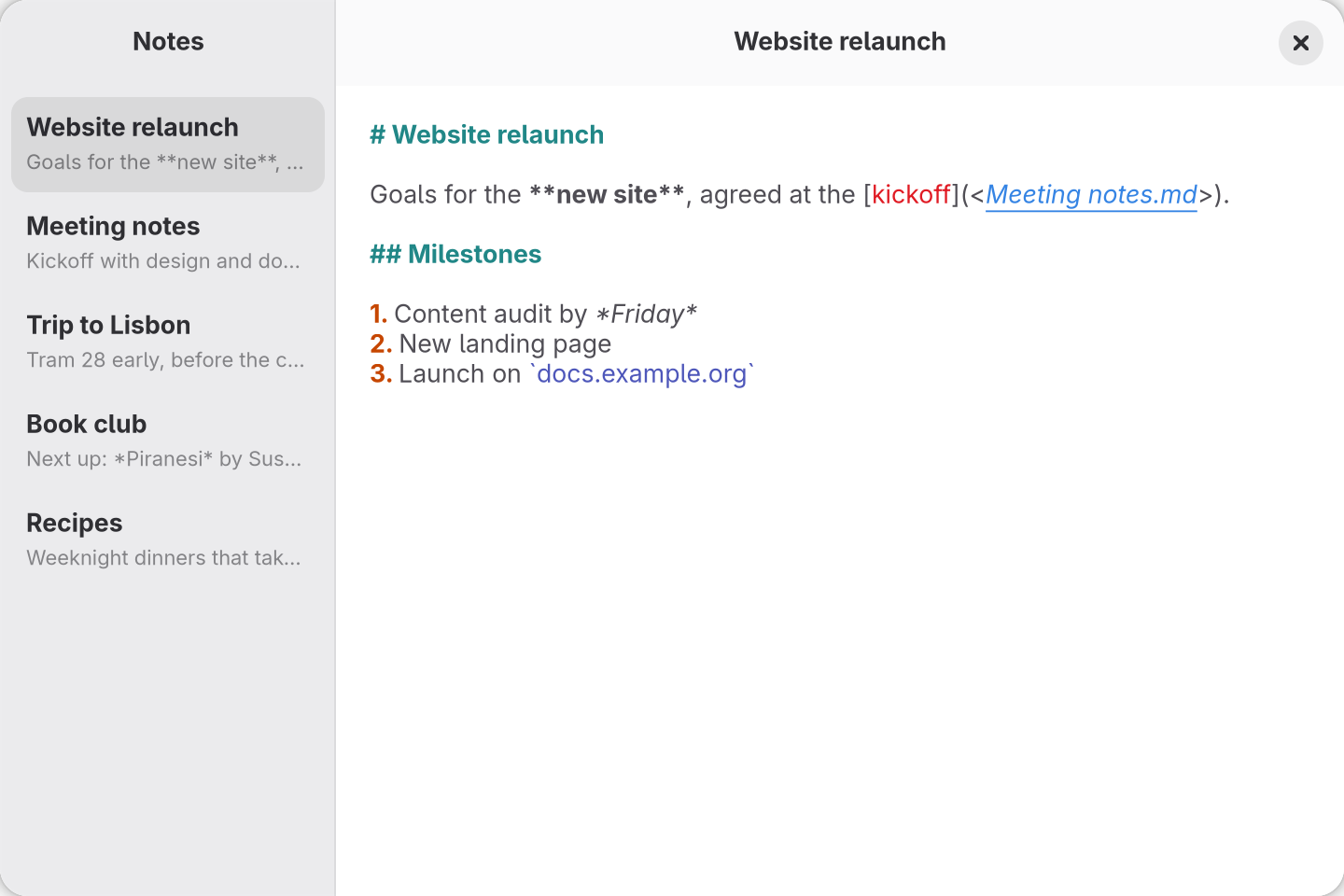
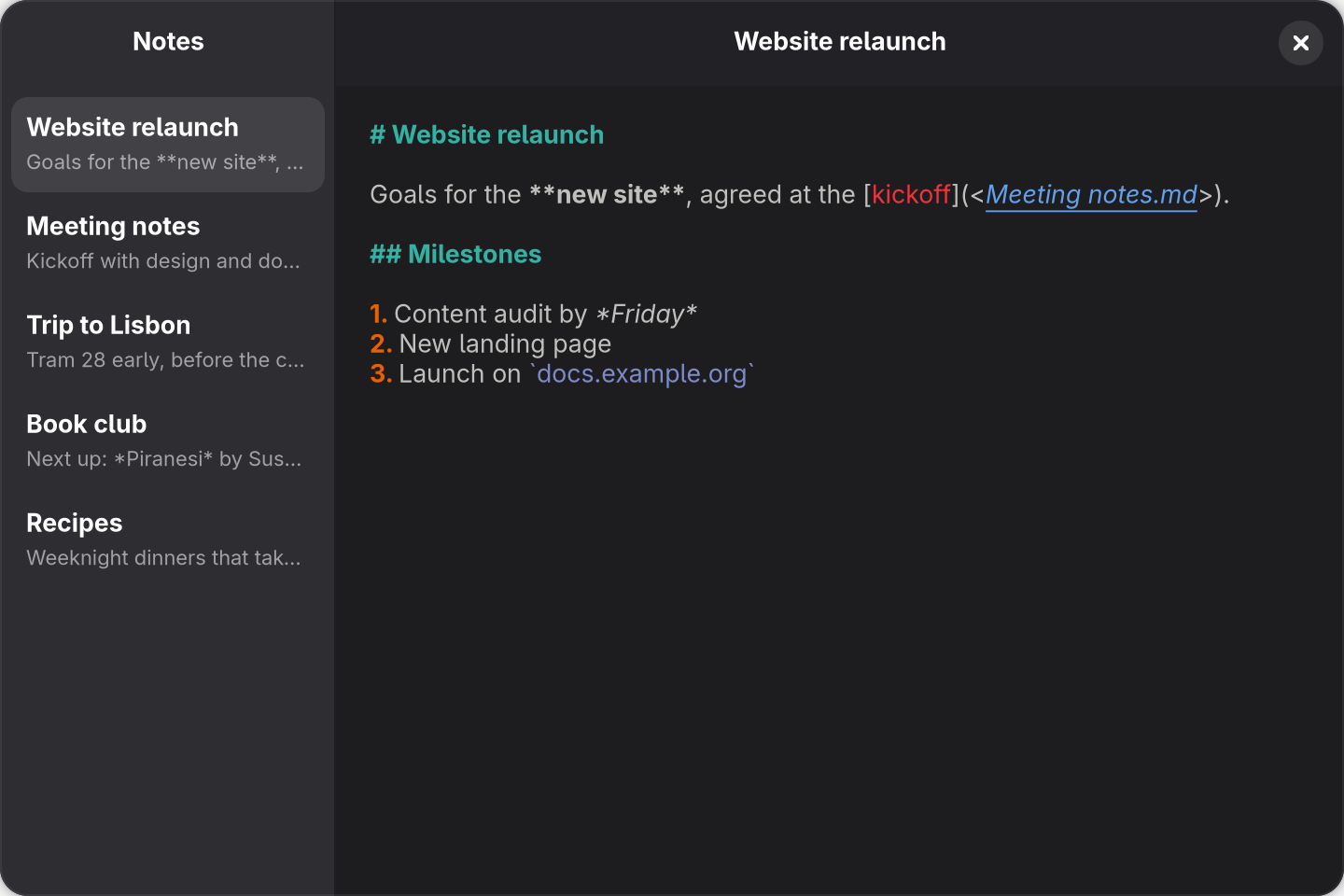
src/app.tsx above, after clicking Website relaunch.