

Render the Preview
Parse each note with mdast-util-from-markdown and render its syntax tree as GTK widgets, so the preview is native text that follows the system style.
Parse Markdown
Install the parser and the types of the tree it returns:
npm install mdast-util-from-markdown
npm install -D @types/mdast
fromMarkdown turns a note's text into an mdast syntax tree: a root node whose children are blocks, such as headings, paragraphs and lists, which hold inline nodes, such as text, emphasis and links. It is an ordinary npm package, running in the app's Node.js process like the file APIs.
The list's excerpt has been the first line that isn't a heading, as written, so Book club reads Next up: *Piranesi* with its asterisks. Removing the syntax with regular expressions would miss links, escapes and nested formatting, while the tree holds the text without it. src/notes/note.ts now takes the excerpt from the tree:
import type { Nodes, PhrasingContent } from "mdast";
import { fromMarkdown } from "mdast-util-from-markdown";
firstParagraphwalks the tree depth first and returns the first paragraph's text, including one inside a list item or a block quote. It skips headings, which usually repeat the note's name, and code blocks, which aren't paragraphs.plainTextjoins a paragraph's inline nodes: emphasis and links give their children's text, inline code its code, an image its description, and a line break a space.
Map nodes to widgets
Inline formatting becomes Pango markup, the tags a GtkLabel renders when useMarkup is set. A new folder, src/preview/, holds the conversion in markup.ts:
import * as GLib from "@gtkx/gi/glib";
import type { PhrasingContent } from "mdast";

const escape = (text: string): string => GLib.markupEscapeText(text, -1);

const toMarkup = (nodes: PhrasingContent[]): string =>
    nodes.map(nodeMarkup).join("");

const nodeMarkup = (node: PhrasingContent): string => {
    switch (node.type) {
        case "text":
        case "html":
            return escape(node.value);
        case "inlineCode":
            return `<tt>${escape(node.value)}</tt>`;
        case "emphasis":
            return `<i>${toMarkup(node.children)}</i>`;
        case "strong":
            return `<b>${toMarkup(node.children)}</b>`;
        case "delete":
            return `<s>${toMarkup(node.children)}</s>`;
        case "link":
            return `<a href="${escape(node.url)}">${toMarkup(node.children)}</a>`;
        case "linkReference":
            return toMarkup(node.children);
        case "image":
        case "imageReference":
            return escape(node.alt ?? "");
        case "break":
            return "\n";
        case "footnoteReference":
            return `<sup>${escape(node.label ?? node.identifier)}</sup>`;
    }
};

export { toMarkup };GLib.markupEscapeTextescapes the note's own text, so a<or&in a note shows as written instead of breaking the markup. Inline HTML shows as text too.- A link becomes an
<a href>tag, which the label underlines and makes clickable. fromMarkdownfollows CommonMark, so GitHub's strikethrough, tables and task lists stay as text.@types/mdastalso types the nodes of those extensions, such asdeleteandfootnoteReference. Theswitchhandles every inline type@types/mdastlists, and thestringreturn type makes TypeScript report any it misses.
src/preview/markdown-preview.tsx renders the blocks:
import * as Gtk from "@gtkx/gi/gtk";
import * as Pango from "@gtkx/gi/pango";
import { useTranslation } from "@gtkx/i18n";
import { AdwClamp } from "@gtkx/jsx/adw";
import {
    GtkBox,
    GtkLabel,
    GtkScrolledWindow,
    GtkSeparator,
} from "@gtkx/jsx/gtk";
import type {
    Blockquote,
    Code,
    Heading,
    List,
    Paragraph,
    RootContent,
} from "mdast";
import { fromMarkdown } from "mdast-util-from-markdown";
import { createContext, use, useMemo } from "react";
import { toMarkup } from "./markup.js";

const LinkContext = createContext<(uri: string) => boolean>(() => false);

const HEADING_CLASSES = [
    "title-1",
    "title-2",
    "title-3",
    "title-4",
    "heading",
    "heading",
];

type TextBlockProps = {
    markup: string;
    cssClasses?: string[];
    accessibleRole?: Gtk.AccessibleRole;
};

const TextBlock = ({
    markup,
    cssClasses = [],
    accessibleRole = Gtk.AccessibleRole.LABEL,
}: TextBlockProps) => {
    const onLink = use(LinkContext);

    return (
        <GtkLabel
            accessibleRole={accessibleRole}
            label={markup}
            useMarkup
            wrap
            wrapMode={Pango.WrapMode.WORD_CHAR}
            xalign={0}
            cssClasses={cssClasses}
            onActivateLink={(uri) => onLink(uri)}
        />
    );
};

const HeadingBlock = ({ node }: { node: Heading }) => (
    <TextBlock
        accessibleRole={Gtk.AccessibleRole.HEADING}
        markup={toMarkup(node.children)}
        cssClasses={[HEADING_CLASSES[node.depth - 1] ?? "heading"]}
    />
);

const ParagraphBlock = ({ node }: { node: Paragraph }) => (
    <TextBlock markup={toMarkup(node.children)} />
);

const CodeBlock = ({ node }: { node: Code }) => (
    <GtkLabel
        label={node.value}
        selectable
        wrap
        wrapMode={Pango.WrapMode.WORD_CHAR}
        xalign={0}
        cssClasses={["monospace"]}
    />
);

const QuoteBlock = ({ node }: { node: Blockquote }) => (
    <GtkBox
        orientation={Gtk.Orientation.VERTICAL}
        spacing={12}
        cssClasses={["dimmed"]}
    >
        <Blocks nodes={node.children} />
    </GtkBox>
);

const ListBlock = ({ node }: { node: List }) => (
    <GtkBox
        orientation={Gtk.Orientation.VERTICAL}
        spacing={node.spread ? 12 : 6}
    >
        {node.children.map((item, index) => (
            <GtkBox key={index} spacing={8}>
                <GtkLabel
                    label={node.ordered ? `${(node.start ?? 1) + index}.` : "•"}
                    valign={Gtk.Align.START}
                    widthChars={2}
                    xalign={1}
                />
                <GtkBox
                    orientation={Gtk.Orientation.VERTICAL}
                    spacing={6}
                    hexpand
                >
                    <Blocks nodes={item.children} />
                </GtkBox>
            </GtkBox>
        ))}
    </GtkBox>
);

const Block = ({ node }: { node: RootContent }) => {
    switch (node.type) {
        case "heading":
            return <HeadingBlock node={node} />;
        case "paragraph":
            return <ParagraphBlock node={node} />;
        case "code":
            return <CodeBlock node={node} />;
        case "blockquote":
            return <QuoteBlock node={node} />;
        case "list":
            return <ListBlock node={node} />;
        case "thematicBreak":
            return <GtkSeparator />;
        case "html":
            return (
                <TextBlock
                    markup={toMarkup([node])}
                    cssClasses={["monospace", "dimmed"]}
                />
            );
        default:
            return null;
    }
};

const Blocks = ({ nodes }: { nodes: RootContent[] }) =>
    nodes.map((node, index) => <Block key={index} node={node} />);

type MarkdownPreviewProps = {
    text: string;
    onActivateLink?: (uri: string) => boolean;
};

const MarkdownPreview = ({
    text,
    onActivateLink = () => false,
}: MarkdownPreviewProps) => {
    const { t } = useTranslation();
    const tree = useMemo(() => fromMarkdown(text), [text]);

    return (
        <GtkScrolledWindow vexpand hscrollbarPolicy={Gtk.PolicyType.NEVER}>
            <AdwClamp maximumSize={720}>
                <GtkBox
                    accessibleRole={Gtk.AccessibleRole.DOCUMENT}
                    accessibleLabel={t("Preview")}
                    orientation={Gtk.Orientation.VERTICAL}
                    spacing={12}
                    marginTop={18}
                    marginBottom={18}
                    marginStart={18}
                    marginEnd={18}
                >
                    <LinkContext value={onActivateLink}>
                        <Blocks nodes={tree.children} />
                    </LinkContext>
                </GtkBox>
            </AdwClamp>
        </GtkScrolledWindow>
    );
};

export { MarkdownPreview };MarkdownPreviewparses the text inuseMemo, so it parses again only when the text changes, and renders the root's children.Blockpicks a widget for each block node. Headings, paragraphs and HTML blocks are labels with markup, and a code block is a monospace label the user can select. A block quote and each list item render their own children, so lists and quotes nest. Other nodes, such as link definitions, render nothing.- The labels take their look from libadwaita style classes:
title-1totitle-4andheadingsize the headings,monospacesets code in a fixed-width font, anddimmedlowers a quote's contrast. They follow the system's light and dark styles without any CSS. AdwClampkeeps lines a readable length in a wide window, and the scrolled window scrolls only vertically, since the labels wrap.accessibleRoletells screen readers what each widget is: the preview is a document named Preview, and headings are headings rather than plain labels. Test the App finds them by these roles.- Every label reports an activated link through
onActivateLink. Blocks nest to any depth, soLinkContexthands the handler down rather than passing it through every block's props; see React'screateContext.
Switch between editor and preview
The note screen, src/components/note-screen.tsx, puts the editor and the preview in a GtkStack, which shows one child at a time:
import * as Gtk from "@gtkx/gi/gtk";
import { useTranslation } from "@gtkx/i18n";
import { AdwStatusPage } from "@gtkx/jsx/adw";
import { GtkStack, GtkStackPage } from "@gtkx/jsx/gtk";
import type { SplitViewScreenProps } from "@gtkx/navigation";
import { NoteEditor } from "../editor/note-editor.js";
import type { RootParamList } from "../navigation.js";
import { linkedNoteName } from "../notes/files.js";
import { useNotes } from "../notes/notes-provider.js";
import { MarkdownPreview } from "../preview/markdown-preview.js";
type NoteScreenProps = SplitViewScreenProps<RootParamList, "Note"> & {
preview: boolean;
};
- Each child sits in a
GtkStackPage, the object the stack keeps for it, andvisibleChildNameshows the page with thatname. The crossfade animates the switch. - Both pages stay mounted, so the editor keeps its cursor and undo history while the preview shows, and the preview follows every edit.
previewarrives as a prop, next to the navigator'srouteandnavigation.
The toggle button that sets preview belongs in the note's header bar, which the navigator builds from the screen's options, so the state lives in src/app.tsx:
import { ToastProvider } from "@gtkx/components";
import type * as Adw from "@gtkx/gi/adw";
import { useTranslation } from "@gtkx/i18n";
import {
    AdwApplication,
    AdwApplicationWindow,
    AdwStatusPage,
    AdwToastOverlay,
} from "@gtkx/jsx/adw";
import { GtkToggleButton } from "@gtkx/jsx/gtk";
import { NavigationContainer } from "@gtkx/navigation";
import { quit } from "@gtkx/react";
import { useRef, useState } from "react";
import { NoteScreen } from "./components/note-screen.js";
import { NotesScreen } from "./components/notes-screen.js";
import { Split } from "./navigation.js";
import { defaultFolder } from "./notes/files.js";
import { NotesProvider } from "./notes/notes-provider.js";

function App() {
    const { t } = useTranslation();
    const toastOverlayRef = useRef<Adw.ToastOverlay | null>(null);
    const [preview, setPreview] = useState(false);

    return (
        <AdwApplication>
            <AdwApplicationWindow
                title={t("Notes")}
                defaultWidth={720}
                defaultHeight={480}
                widthRequest={360}
                heightRequest={294}
                onCloseRequest={() => quit()}
            >
                <ToastProvider overlayRef={toastOverlayRef}>
                    <NotesProvider folder={defaultFolder()}>
                        <AdwToastOverlay ref={toastOverlayRef}>
                            <NavigationContainer>
                                <Split.Navigator
                                    contentPlaceholder={
                                        <AdwStatusPage
                                            iconName="document-edit-symbolic"
                                            title={t("No Note Selected")}
                                        />
                                    }
                                >
                                    <Split.Screen
                                        name="Notes"
                                        component={NotesScreen}
                                        options={{ title: t("Notes") }}
                                    />
                                    <Split.Screen
                                        name="Note"
                                        options={({ route }) => ({
                                            title: route.params.name,
                                            headerEnd: (
                                                <GtkToggleButton
                                                    iconName="view-reveal-symbolic"
                                                    tooltipText={t("Preview")}
                                                    active={preview}
                                                    onNotifyActive={setPreview}
                                                />
                                            ),
                                        })}
                                    >
                                        {(props) => (
                                            <NoteScreen
                                                {...props}
                                                preview={preview}
                                            />
                                        )}
                                    </Split.Screen>
                                </Split.Navigator>
                            </NavigationContainer>
                        </AdwToastOverlay>
                    </NotesProvider>
                </ToastProvider>
            </AdwApplicationWindow>
        </AdwApplication>
    );
}

export { App };headerEndputs the button at the end of the content pane's header bar; Headers lists the other header options.activeandonNotifyActivekeep the button and the state in step, as in The JSX prop model.- The
Notescreen takes a function as its child instead ofcomponent, so it can passpreviewalong with the navigator's props; see React Navigation's Passing additional data. - The state outlives each note, so the preview stays on when another note opens. Add Menus and Shortcuts turns the button into a window action with a keyboard shortcut.
Follow links
Website relaunch links to another note with [kickoff](<Meeting notes.md>). A link like that should open the note in the app. src/notes/files.ts gains linkedNoteName, which turns a link into a note name:
import * as GLib from "@gtkx/gi/glib";
import { mkdir, readdir, readFile, stat, writeFile } from "node:fs/promises";
import { join } from "node:path";
import { type Note, toNote } from "./note.js";
const EXTENSION = ".md";
const defaultFolder = (): string =>
join(
GLib.getUserSpecialDir(GLib.UserDirectory.DIRECTORY_DOCUMENTS) ??
GLib.getHomeDir(),
"Notes",
);
const noteName = (fileName: string): string | null =>
fileName.endsWith(EXTENSION) && !fileName.startsWith(".")
? fileName.slice(0, -EXTENSION.length)
: null;
const linkedNoteName = (uri: string): string | null => {
const fileName =
GLib.Uri.peekScheme(uri) === null
? GLib.Uri.unescapeString(uri, "/")
: null;
GLib.Uri.peekSchemereturnsnullfor a relative link, one without a scheme such ashttps:.GLib.Uri.unescapeStringdecodes escapes such as%20, and returnsnullwhen the link escapes a/.- A link into another folder gives
null, andnoteName, which the folder listing uses, accepts only a visible.mdfile.
openLinkedNote in the note screen above navigates to the linked note and returns true, which tells the label the link is handled. For any other link it returns false, and the label's default handler for activate-link opens it in the app the system uses for it, such as the web browser. A link to a note the folder doesn't have shows Note Not Found.
Run it
Save the files. The new imports restart the app. The excerpts in the list now show text without Markdown syntax.
Open a note and press the eye button in its header bar: the note shows as headings, formatted paragraphs and lists. Activate a link to another note to open it.
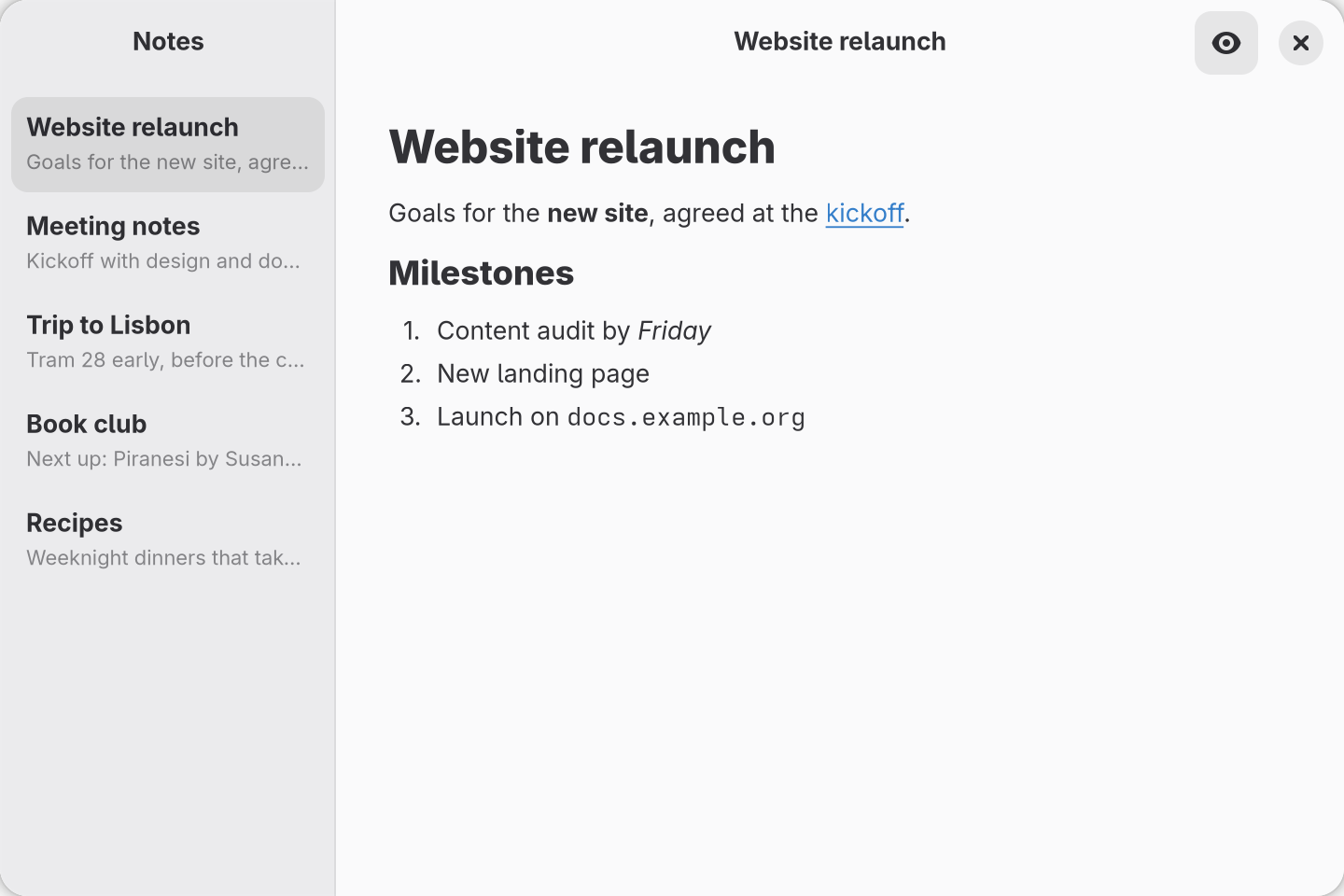
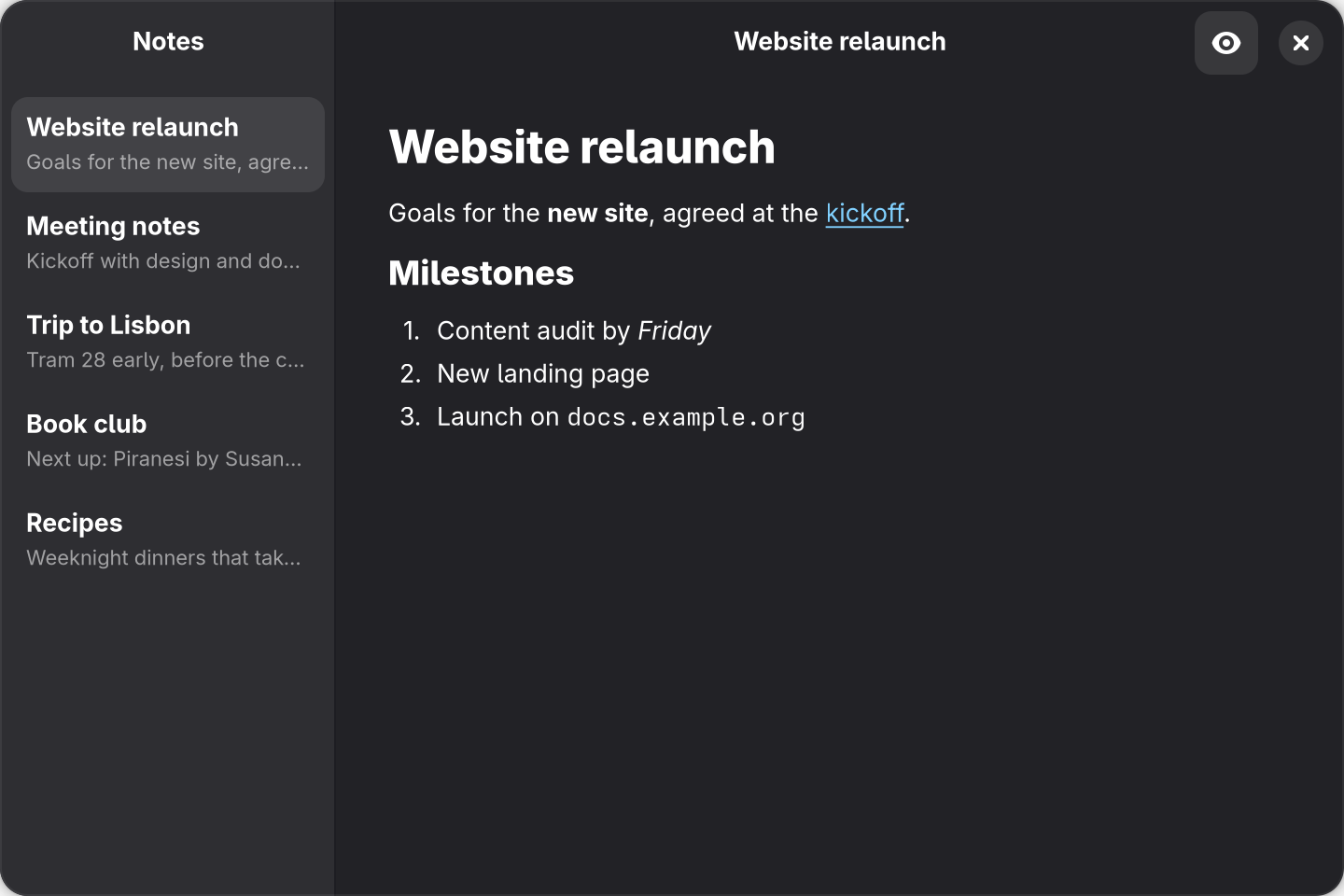
src/app.tsx above, after opening Website relaunch and turning on the preview.